
Can you post the Nagios configuration file for that server so we can view it?
It looks like the service check is missing for the Exchange check.
How to complete installing a plugin from Nagios Exchange
Re: How to complete installing a plugin from Nagios Exchange
Be sure to check out our Knowledgebase for helpful articles and solutions!
Re: How to complete installing a plugin from Nagios Exchange
I uploaded nagios.cfg file. Kindly help me check. Thanks.
- Attachments
-
 nagios.cfg
- (43.78 KiB) Downloaded 437 times
Re: How to complete installing a plugin from Nagios Exchange
That's the main Nagios configuration file. We need to see the config file for the specific server that you are trying to monitor.
Former Nagios employee
Re: How to complete installing a plugin from Nagios Exchange
If i understood you, that is NSClient++ which i installed on Exchange Server. See nsclient.ini as attached file.
Kindly feedback again if i was wrong. Thank you!
Kindly feedback again if i was wrong. Thank you!
- Attachments
-
- nsclient.ini
- (7.34 KiB) Downloaded 427 times

Re: How to complete installing a plugin from Nagios Exchange
Did you place your PS script in "C:\NagiosMonitoring\"? Usually, scripts are placed in the "C:\Program Files\NSClient++\scripts" directory. Try moving your script there, then change your command from this:
to this:
and restart the NSClient++ service.
Test it by running the following command from the command line on the Nagios XI server:
If you are still having issues, load all of the "defaults" in the nsclient.ini file by running the following in the CMD Prompt on the Windows machine as administrator:
Next, upload the updated nsclient.ini file on the forum. We may need to tweak some of the settings in there.
Code: Select all
LyncFrontendServicesCheck=cmd /c echo C:\NagiosMonitoring\NagiosMonitoring_Exchange2016_Services.ps1 | PowerShell.exe -Command -Code: Select all
LyncFrontendServicesCheck=cmd /c echo scripts\NagiosMonitoring_Exchange2016_Services.ps1; exit $LastExitCode | powershell.exe -command -Test it by running the following command from the command line on the Nagios XI server:
Code: Select all
/usr/local/nagios/libexec/check_nrpe -H <client ip> -c LyncFrontendServicesCheckCode: Select all
cd "C:\Program Files\NSClient++"
nscp settings --generate --add-defaults --load-allBe sure to check out our Knowledgebase for helpful articles and solutions!
Re: How to complete installing a plugin from Nagios Exchange
Hello,
I followed up your instruction steps and here is report. Hope you find the problem. Thanks
1) Output command
By the way, Anyone share me the photo of final result if there is sucesfulled configure.
I followed up your instruction steps and here is report. Hope you find the problem. Thanks
1) Output command
2) Output command "nscp settings --generate --add-defaults --load-all"Service OK: All services are up and running
3) See newest nsclient.ini as attached.C:\Program Files\NSClient++>nscp settings --generate --add-defaults --load-all
l scripts\commands.hpp:100 Failed to parse arguments for command 'LyncFrontendS
ervicesCheck', using old split string method: unknown escape sequence: cmd /c ec
ho scripts\NagiosMonitoring_Exchange2016_Services.ps1; exit $LastExitCode | powe
rshell.exe -command -
Adding default values
By the way, Anyone share me the photo of final result if there is sucesfulled configure.
- Attachments
-
- nsclient.ini
- (22.12 KiB) Downloaded 442 times
Re: How to complete installing a plugin from Nagios Exchange
Hi rafael,
If you're getting:
that means the plugin is up and running. Not sure why you're getting the parsing message but the config appears to be good and returning what you'd want now.
If you're getting:
Code: Select all
Service OK: All services are up and runningAs of May 25th, 2018, all communications with Nagios Enterprises and its employees are covered under our new Privacy Policy.
Re: How to complete installing a plugin from Nagios Exchange
Hi cdienger,
Now, I'd like to look the results/achieves. Where can i find it ? What's all Exchange services state information ? I could only view like photo below.
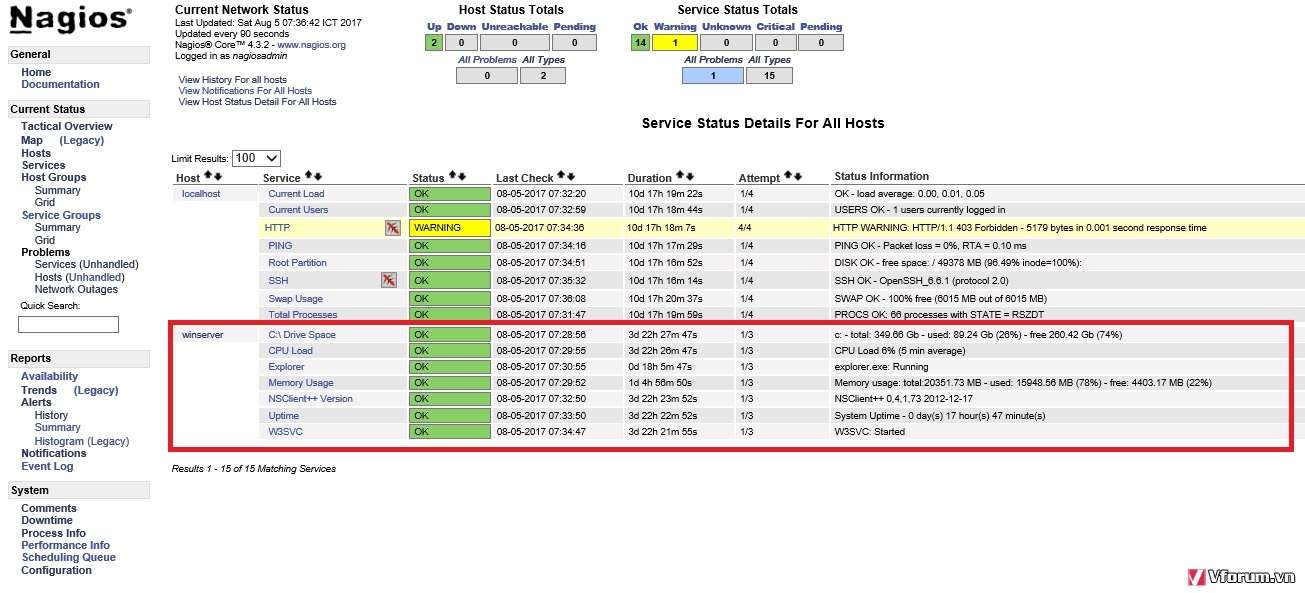
Now, I'd like to look the results/achieves. Where can i find it ? What's all Exchange services state information ? I could only view like photo below.
Re: How to complete installing a plugin from Nagios Exchange
Any one can show me the result sample ? And where can i find it on my Nagios ?
Thanks.
Thanks.
Re: How to complete installing a plugin from Nagios Exchange
The script will return a result like this if all services are up and running:
Service OK: All services are up and running
To see the results you must create config for this check Under Configure > CCM > Services. For example:
Service OK: All services are up and running
To see the results you must create config for this check Under Configure > CCM > Services. For example:
- Attachments
-
As of May 25th, 2018, all communications with Nagios Enterprises and its employees are covered under our new Privacy Policy.