Page 2 of 3
Re: Need Plugin Recommendation For Monitoring Shared Folder
Posted: Wed Dec 09, 2015 3:54 pm
by Jacktivated
[quote="rkennedy"]Navigate to the directory where the config files are stored -
At the bottom of the file
objects.cfg, add the following lines -
(this part does not need to be modified.)
Code: Select all
# 'check_smb_share_AA' command definition
define command{
        command_name    check_smb_share_AA
        command_line    $USER1$/check_smb_share_AA -H $HOSTADDRESS$ -U $ARG1$ -S $ARG2$
        }
Hmmm...
I do not have an objects.cfg file. There is an objects folder, which contains all the config files, but objects.cfg isn't one of them. Possibly the commands.cfg file? But then that changes the rest of the steps in your instructions, right?
Here is the contents of the objects directory:
[root@nagioscore objects]# ls -l
total 132
-rw-r--r-- 1 root root 8482 Dec 7 15:05 commands.cfg
-rw-rw-r--. 1 nagios nagios 2765 Dec 1 15:08 contacts.cfg
-rw-rw-r--. 1 nagios nagios 5375 Aug 27 14:02 localhost.cfg
-rw-rw-r--. 1 nagios nagios 13805 Dec 7 15:04 printer.cfg
-rw-r--r-- 1 root root 3027 Aug 31 11:17 snmpd.conf
-rw-rw-r--. 1 nagios nagios 4115 Nov 18 16:30 switch.cfg
-rw-rw-r--. 1 nagios nagios 14729 Dec 7 14:28 templates.cfg
-rw-rw-r--. 1 nagios nagios 3180 Aug 27 14:02 timeperiods.cfg
-rw-rw-r--. 1 nagios nagios 13462 Dec 8 11:04 windows.cfg
Re: Need Plugin Recommendation For Monitoring Shared Folder
Posted: Wed Dec 09, 2015 3:59 pm
by rkennedy
Ah, that's my mistake. The correct file you need to edit is /usr/local/nagios/etc/objects/commands.cfg.
Re: Need Plugin Recommendation For Monitoring Shared Folder
Posted: Wed Dec 09, 2015 4:40 pm
by Jacktivated
rkennedy wrote:Ah, that's my mistake. The correct file you need to edit is /usr/local/nagios/etc/objects/commands.cfg.
Cool, thanks.
Okay, I did that in commands.cfg, and then I created a file and made changes to the areas as you said, but it isn't showing up as of yet.
One thing I noticed is the <host> field. Is it important to have a name here? This server isn't even on our network or domain, and I honestly don't even know its name. What I have for it, is an ip address\foldershare and a username and password to access it.
I tried to put the ip in the host field instead of the name, but it didn't work.
Any ideas?
I feel like I'm so close to getting one of these to work! lol...thanks again.
Re: Need Plugin Recommendation For Monitoring Shared Folder
Posted: Wed Dec 09, 2015 4:50 pm
by rkennedy
Make sure that with those 2 occurrences are the same - under the define host, and define service. You can use an IP there, or a simple name.
What happens when you restart your nagios service?
Re: Need Plugin Recommendation For Monitoring Shared Folder
Posted: Thu Dec 10, 2015 3:02 pm
by Jacktivated
rkennedy wrote:Navigate to the directory where the config files are stored -
At the bottom of the file
commands.cfg, add the following lines -
(this part does not need to be modified.)
Code: Select all
# 'check_smb_share_AA' command definition
define command{
        command_name    check_smb_share_AA
        command_line    $USER1$/check_smb_share_AA -H $HOSTADDRESS$ -U $ARG1$ -S $ARG2$
        }
From there, navigate to the folder where your host / service configuration files are stored -
Open a new file with the name '<host>.cfg' and add the following lines. Modify to your needs.
Code: Select all
define host {
        use                             linux-server
        host_name                       <host>
        alias                           <host alias>
        address                         <ip address of server>
        max_check_attempts              5
        check_period                    24x7
        notification_interval           30
        notification_period             24x7
}
define service {
        use                             generic-service
        host_name                      <host> (must be the same as the one entered above)
        service_description             <decription of service>
        check_command                   check_smb_share_AA!username%password!<share folder>
}
Notice that username%password is defined as $ARG1$, <share folder> corresponds to $ARG2$. You can add more $ARG#$ values if needed for a certain scripts.
Restart Nagios -
Now navigate to your 'Services' page and the check should be functioning properly.
Has this helped you setup a check?
Okay...I finally got some results in dashboard!
I eventually found that I needed to go into nagios.cfg, and reference the new host file I created in the objects folder, WEBTRANSFER.CFG:
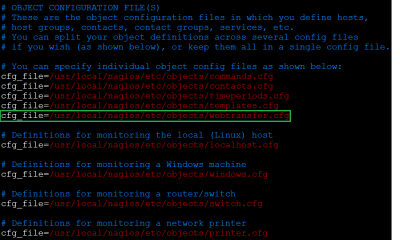
- nagios.cfg-webtransfer
So that made it show up in the dashboard, but now it's showing the host as being down and I'm not getting notifications for the service check (after purposefully changing the password to something incorrect). Is it because I have it set as a windows host? Is there something else should be doing?
Also, since the machine isn't on my network, I don't want to check the host's availability, I only want to check this one service and have it all be green, instead of pink. Can you help me cross the finish line?
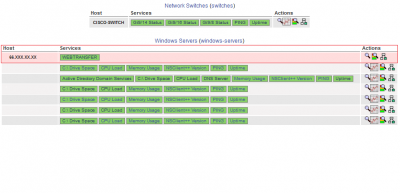
- dashboard - webtransfer
Thanks very much. I have been learning a lot.
Re: Need Plugin Recommendation For Monitoring Shared Folder
Posted: Thu Dec 10, 2015 3:17 pm
by rkennedy
The reason I initially told you to put the .cfg file in the /servers/ folder is because you won't have to edit the nagios.cfg (it automatically includes configs in the /servers/ folder).
Code: Select all
cfg_dir=/usr/local/nagios/etc/servers
The check that's failing now is a ping check, can you try to ping the address from your Nagios machine and post the result?
Re: Need Plugin Recommendation For Monitoring Shared Folder
Posted: Fri Dec 11, 2015 12:17 pm
by Jacktivated
rkennedy wrote:The reason I initially told you to put the .cfg file in the /servers/ folder is because you won't have to edit the nagios.cfg (it automatically includes configs in the /servers/ folder).
Code: Select all
cfg_dir=/usr/local/nagios/etc/servers
The check that's failing now is a ping check, can you try to ping the address from your Nagios machine and post the result?
Yeah, exactly. The problem is that this is not a pingable host. Pings are disabled so I would like to exclude any host checks and just monitor the share autherntication with check_smb_share_AA.
And then, I need to have notification working correctly for that particular thing.
Otherwise, this is nearly done! Thanks.
Re: Need Plugin Recommendation For Monitoring Shared Folder
Posted: Fri Dec 11, 2015 12:30 pm
by rkennedy
For this, add we'll need to create a dummy command.
Add this to your commands.cfg -
Code: Select all
# 'check_dummy' command definition
define command{
command_name    check_dummy
command_line    $USER1$/check_dummy 0
}
Now open the host / service file you just created and look for -
Code: Select all
define host {
        use                             linux-server
        host_name                       <host>
        alias                           <host alias>
        address                         <ip address of server>
        max_check_attempts              5
        check_period                    24x7
        notification_interval           30
        notification_period             24x7
}
After
address <ip address of server>
Add
check_command check_dummy
Example -
Code: Select all
        address                         <ip address of server>
        check_command                check_dummy
        max_check_attempts              5
Re: Need Plugin Recommendation For Monitoring Shared Folder
Posted: Fri Dec 11, 2015 3:52 pm
by Jacktivated
rkennedy wrote:For this, add we'll need to create a dummy command.
Add this to your commands.cfg -
Code: Select all
# 'check_dummy' command definition
define command{
command_name    check_dummy
command_line    $USER1$/check_dummy 0
}
Now open the host / service file you just created and look for -
Code: Select all
define host {
        use                             linux-server
        host_name                       <host>
        alias                           <host alias>
        address                         <ip address of server>
        max_check_attempts              5
        check_period                    24x7
        notification_interval           30
        notification_period             24x7
}
After
address <ip address of server>
Add
check_command check_dummy
Example -
Code: Select all
        address                         <ip address of server>
        check_command                check_dummy
        max_check_attempts              5
Okay...status is up! Thank you.
Now, I just need to get the notifications working correctly. I changed the password in the cfg file I created, and managed to get a notification that it was critical, but it didn't send a recovery email.
Re: Need Plugin Recommendation For Monitoring Shared Folder
Posted: Mon Dec 14, 2015 11:01 am
by Jacktivated
I managed to get the recovery emails working, so it looks as if this plugin is successfully installed and effectively monitoring our password protected inter-network share for credential expiration.
This experience has taught me more about how these plugins work within Nagios Core and how to manage them.
I am so grateful to RKennedy for taking the time to help me every step of the way through getting this done.
Thank you very much!