Page 2 of 2
Re: NCPA new install not working on RHEL 6.9 server
Posted: Thu Oct 24, 2019 5:33 am
by hpzaramk
I have installed NCPA using the following command, Looks like it sets the in-sufficient privilege on the directory..
rpm -Uvh https://assets.nagios.com/downloads/ncp ... x86_64.rpm
Can you confirm if this is the correct command to use as i need to deploy NCPA on multiple RHEL nodes ? Do i need to use rpm -ivh instead of Uvh as its the fresh install..
Thanks,
Ram.
Re: NCPA new install not working on RHEL 6.9 server
Posted: Thu Oct 24, 2019 9:13 am
by lmiltchev
Yes, this is the correct command as outlined in our documentation:
https://assets.nagios.com/downloads/ncp ... g-NCPA.pdf
Why would you be getting different (not sufficient) permissions on your system is beyond me... I tested the install on RHEL 6 and RHEL 7, and in both cases, the permissions were correct.
Code: Select all
[root@TEST_XI_RHEL_6 ~]# rpm -Uvh https://assets.nagios.com/downloads/ncpa/ncpa-latest.el6.x86_64.rpm
Retrieving https://assets.nagios.com/downloads/ncpa/ncpa-latest.el6.x86_64.rpm
Preparing...                ########################################### [100%]
Updating / installing...
   1:ncpa-2.1.9-1.el6                 ################################# [100%]

[root@TEST_XI_RHEL_6 ~]# ll -d /usr/local/ncpa/
drwxr-xr-x 7 root root 4096 Oct 24 08:58 /usr/local/ncpa/
[root@TEST_XI_RHEL_6 ~]# ll -d /usr/local/ncpa/etc
drwxrwxr-x 3 root nagios 4096 Oct 24 08:58 /usr/local/ncpa/etc
[root@TEST_XI_RHEL_6 ~]# ll -d /usr/local/ncpa/etc/ncpa.cfg.d/
drwxrwxr-x 2 root nagios 4096 Oct 24 08:58 /usr/local/ncpa/etc/ncpa.cfg.d/
Code: Select all
[root@TEST_XI_RHEL_7 ~]# rpm -Uvh https://assets.nagios.com/downloads/ncpa/ncpa-latest.el7.x86_64.rpm
Retrieving https://assets.nagios.com/downloads/ncpa/ncpa-latest.el7.x86_64.rpm
Preparing...                          ################################# [100%]
Updating / installing...
   1:ncpa-2.1.9-1.el7                 ################################# [100%]

[root@TEST_XI_RHEL_7 ~]# ll -d /usr/local/ncpa/
drwxr-xr-x 7 root root 4096 Oct 24 08:59 /usr/local/ncpa/
[root@TEST_XI_RHEL_7 ~]# ll -d /usr/local/ncpa/etc
drwxrwxr-x 3 root nagios 63 Oct 24 08:59 /usr/local/ncpa/etc
[root@TEST_XI_RHEL_7 ~]# ll -d /usr/local/ncpa/etc/ncpa.cfg.d/
drwxrwxr-x 2 root nagios 43 Oct 24 08:59 /usr/local/ncpa/etc/ncpa.cfg.d/
The permissions are set to 775 (for the ncpa.cfg.d directory) and to 664 (for the files in it) in the specs file...
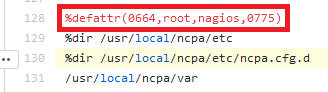
- example01.PNG (6.22 KiB) Viewed 1669 times
https://github.com/NagiosEnterprises/nc ... .spec#L130
I am not able to recreate the issue in-house.
Re: NCPA new install not working on RHEL 6.9 server
Posted: Thu Oct 24, 2019 9:52 am
by hpzaramk
Thank you for testing and continuous response on this issue..
Thanks,
Ram.
Re: NCPA new install not working on RHEL 6.9 server
Posted: Thu Oct 24, 2019 10:02 am
by lmiltchev
Do you have any further questions or it is OK to close this topic? Thank you!
Re: NCPA new install not working on RHEL 6.9 server
Posted: Thu Oct 24, 2019 11:24 am
by hpzaramk
I am happy to close this topic. Your help is much appreciated. This is a fantastic forum with guaranteed response and resolution.
Thanks,
Ram.