Page 1 of 1
Problem on Monitoring Linux-server
Posted: Thu May 05, 2011 6:55 am
by jbmaliwat
Hi!
I am currently configuring Nagios Xl on our client proof of concept. I already successfully installed NagiosXl and agent on Linux-server(client-server) that will be monitor.
Now I'm starting to monitor the Linux-server and configure it, and I got this error. Actually, this is the second Linux-server that I am monitoring. The first one, it is successful. But on the 2nd Linux-server, when I look at the View, this is the result...
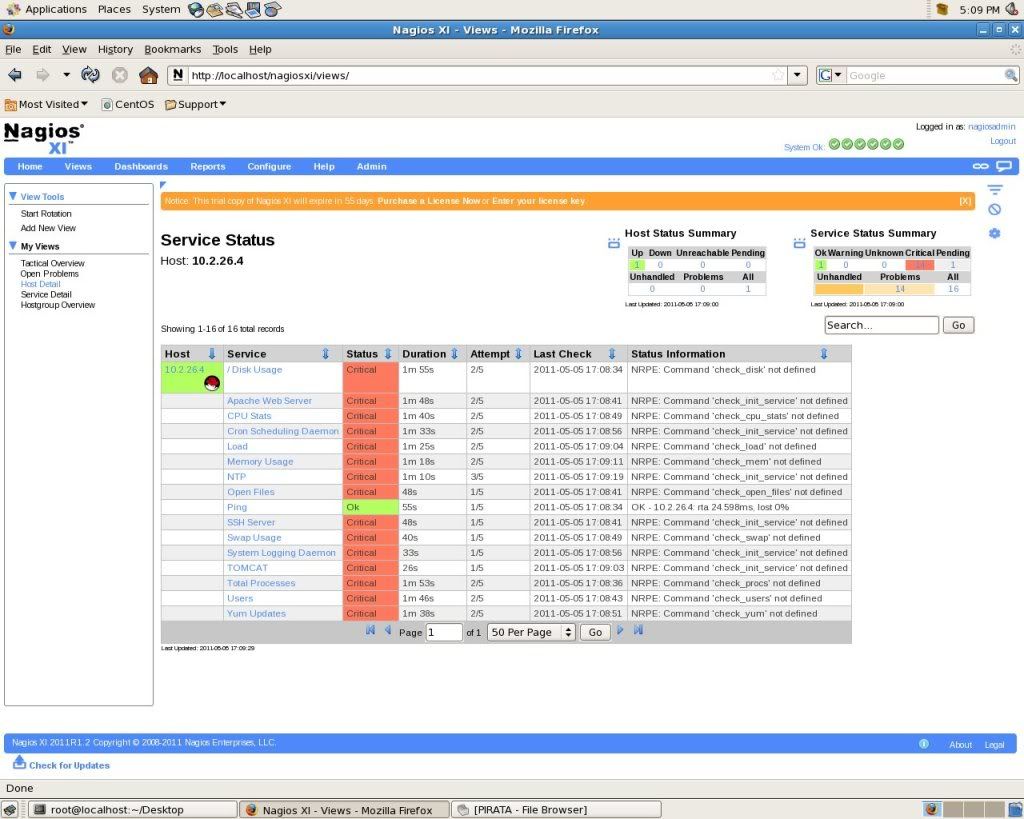
Can you please advise or guide me on what troubleshooting should I do for me to successfully monitored that Linux-server, and was able to see the status of being "ok"...
Thank you very much,
John Benedict Maliwat
Philippines
Re: Problem on Monitoring Linux-server
Posted: Thu May 05, 2011 10:06 am
by tonyyarusso
That error indicates that a step of the agent installation either was skipped or failed. Are you following the latest instructions from
http://library.nagios.com/library/produ ... inux-agent?
Re: Problem on Monitoring Linux-server
Posted: Thu May 05, 2011 8:46 pm
by jbmaliwat
I already successfully installed the linux-agent. I was able to follow the steps on how to Install it.
I think that, its not on the installation of linux-agent was the problem.
Re: Problem on Monitoring Linux-server
Posted: Thu May 05, 2011 9:02 pm
by jbmaliwat
Here is the steps that I did in installing the linux-agent.
*1st Linux-server
tar xzf linux-nrpe-agent-el4.tar.gz
cd linux-nrpe-agent-el4
./fullinstall
- and i encounter a problem
"checking where the gettext function comes from... libc
configure: See http://nagiosplugins.org/faq/compile/co ... rs_to_hang if this next part takes a long time
checking for redhat spopen problem..
what i did is
*cd subcomponents
*cd nagiosplugins
*vi install
on the line of
time ./ configure
--enable-redhat-pthread-workaround ------------------------> I add this after the word configure
and I run the ./fullinstall again, and it is successfully installed.
* and now, I'm starting monitoring the 1st linux-server and it has no problem or error.
*2nd Linux-server
I did the same thing, what I did on the 1st Linux-server. But when I'm starting monitoring the 2nd Linux-server it has an error and a problem.
----------->THE IMAGE THAT I ATTACHED<---------------- it shows there the error that I've encountered.
Re: Problem on Monitoring Linux-server
Posted: Fri May 06, 2011 1:20 am
by tonyyarusso
What is the operating system, version, and architecture of the targets you installed the agent on?
Re: Problem on Monitoring Linux-server
Posted: Fri May 06, 2011 4:26 am
by jbmaliwat
It is RHEL 4.5 32-bit
Re: Problem on Monitoring Linux-server
Posted: Fri May 06, 2011 11:35 am
by mguthrie
Ok, unless I'm mistaken the install script for the Linux agent is for RHEL and CentOS 5x. I will have to ask one of our other techs (who is out today) what steps might need to be taken in order to make the agent work on 4.5