Page 1 of 1
Google maps
Posted: Mon Dec 16, 2013 6:01 pm
by bcdudley
On the integrated Google map, is there a way to either disable or at least de-emphasize the green(up) markers. With over 1000 of them on a map and many clustered, they are blocking out the reds which is what we are really interested in.
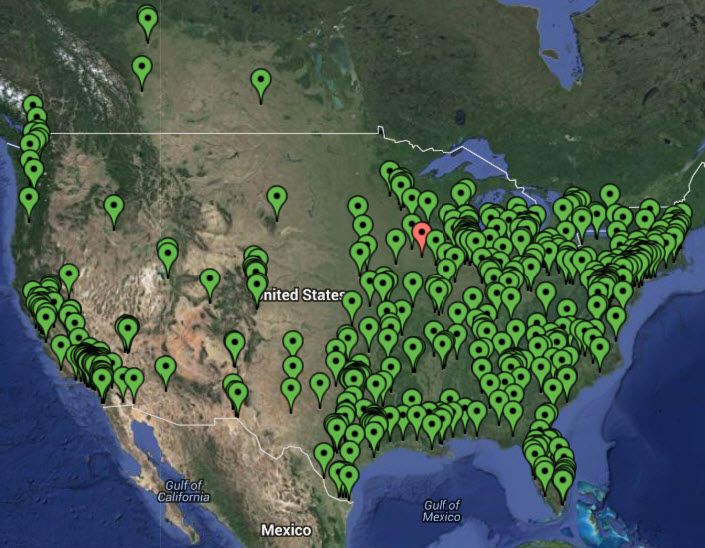
How many red markers can you find.
Give up... There are 3 right now.
Re: Google maps
Posted: Tue Dec 17, 2013 11:19 am
by sreinhardt
Looking at the code for the google maps component\dashlet, it seems that it takes the locations in order given and dumps them into an array for google to map. So, altering the order they are added, OK then warning then critical, I would think this would put the warning and critical on top of the ok flags. This would have to be handled in a bug report, which I think is fairly valid. Tmcdonald has another suggestion that might work in the short term, but might prevent you from clicking read icons as clear ones may be on top.
Re: Google maps
Posted: Tue Dec 17, 2013 12:01 pm
by tmcdonald
Having tested my idea I can conclude that it's neither elegant nor desirable. Making the UP host icon a transparent icon will sorta work but if you have a lot of them they can still cover up the criticals. It all depends on the order they appear in the HTML, and a dev would be the better choice for fixing this.
Re: Google maps
Posted: Tue Dec 17, 2013 5:10 pm
by bcdudley
So should I proceed to submit a bug report, or is this something that is handled internally?
Thank you,
Brian
Re: Google maps
Posted: Tue Dec 17, 2013 5:14 pm
by tmcdonald
I'd actually call this a feature request, even though it might seem a bit weird to do so. And I would recommend submitting it yourself; this might get the devs attention faster than if one of us does it. We can weigh in on it though.
Re: Google maps
Posted: Tue Dec 17, 2013 5:32 pm
by bcdudley
Submitted and referenced back to this post.
http://support.nagios.com/forum/viewtop ... 20&t=24177
Thank you,
Brian
Re: Google maps
Posted: Tue Dec 17, 2013 5:43 pm
by tmcdonald
*ahem*
http://tracker.nagios.com
I suppose I could have been a little more helpful when I said to submit a feature request >_>
Temporary Workaround:
In the Google Maps component, open up the buildmarkers.inc.php file and make the following change:
Code: Select all
foreach($hostArray as $hostdata) //$hostdata is the actual host array
{
	if ($hostdata["icon"] == 'http://www.google.com/mapfiles/marker_green.png') { continue; }
	//validate the note data
	$parts = explode(',',$hostdata['notes']);
adding in the "if ($hostdata...)" part. Save it, zip it back up, and upload it. Should ignore UP hosts. Very hacky but it works.
bcdudley wrote:I would like to request that the Google maps be modified so that it presents the markers on a map in a different order. They should be OK then warning then critical. On high density maps, this would make it to where the warning and critical sites would be on top of ok sites and make them visible.
Please reference post
http://support.nagios.com/forum/viewtop ... =6&t=24157 for an example.
As an alternative or "other feature", I would like to be able to turn off the "ok" markers completely. Again, on a high density map, they are not very relevant.
Thank you.
Brian
Quoted here for the sake of preserving your post.
I will add in my two cents: Possibly have grouping of close incidents or based off parents, so instead of 46 separate host icons, you see one slightly larger that says "46 hosts" or something.
I am going to close this topic since a feature request is being submitted, and remove the other thread.
