check_vmware_api.pl error
Posted: Fri Oct 24, 2014 12:51 am
check_vmware_api.pl error
check_vmware_api.pl Website:
http://www.op5.org/community/plugin-inventory/plugins
my os:centos7
my nagios:4.08
i can use commnad line to get esxi status
but list error at website
[root@localhost libexec]# ./check_vmware_api.pl -H 192.168.1.171 -u root -p XXXXX -l cpu
CHECK_VMWARE_API.PL OK - cpu usage=182.00 MHz (3.04%) | cpu_usagemhz=182.00MHz;; cpu_usage=3.04%;;
[root@localhost libexec]# ./check_vmware_api.pl -H 192.168.1.171 -u root -p XXXXX -l vmfs
CHECK_VMWARE_API.PL OK - Storages : 'datastore1'(free)=4096.00 MB (80.00%), 'nas'(free)=128635.00 MB (25.14%) | datastore1=4096.00MB;; nas=128635.00MB;;
[root@localhost libexec]# ./check_vmware_api.pl -H 192.168.1.171 -u root -p XXXXX -l mem
CHECK_VMWARE_API.PL OK - mem usage=954.28 MB (46.60%), overhead=260.29 MB, swapped=0.00 MB, memctl=0.00 MB | mem_usagemb=954.28MB;; mem_usage=46.60%;; mem_overhead=260.29MB;; mem_swap=0.00MB;; mem_memctl=0.00MB;;
[root@localhost libexec]#
my commnad.cfg
#check_vmware_api_host_cpu_usage' command definition
define command{
command_name check_vmware_api_host_cpu_usage
command_line $USER1$/check_vmware_api.pl -H $HOSTADDRESS$ -u $USER11$ -p $USER12$ -I cpu -s usage -w $ARG1$ -c $ARG2$
}
esxi5_01.cfg
# Define a host for the local machine
define host{
use esxi-server ; Name of host template$
; This host definition$
; in (or inherited by)$
host_name esxi5_01
alias esxi5_01
address 192.168.1.171
contact_groups admins
}
# Define an optional hostgroup for Linux machines
define hostgroup{
hostgroup_name esxi-servers ; The name of the hostgroup
alias VMWARE Servers ; Long name of the group
members esxi5_01 ; Comma separated list of hosts that belo$
}
define service{
use local-service
host_name esxi5_01
service_description VMware CPU Usage
check_command check_vmware_api_host_cpu_usage!80!90
}
i run /usr/local/nagios/bin/nagios -v /usr/local/nagios/etc/nagios.cfg
Nagios Core 4.0.8
Copyright (c) 2009-present Nagios Core Development Team and Community Contributors
Copyright (c) 1999-2009 Ethan Galstad
Last Modified: 08-12-2014
License: GPL
Website: http://www.nagios.org
Reading configuration data...
Read main config file okay...
Read object config files okay...
Running pre-flight check on configuration data...
Checking objects...
Checked 12 services.
Checked 3 hosts.
Checked 2 host groups.
Checked 0 service groups.
Checked 2 contacts.
Checked 1 contact groups.
Checked 67 commands.
Checked 5 time periods.
Checked 0 host escalations.
Checked 0 service escalations.
Checking for circular paths...
Checked 3 hosts
Checked 0 service dependencies
Checked 0 host dependencies
Checked 5 timeperiods
Checking global event handlers...
Checking obsessive compulsive processor commands...
Checking misc settings...
Total Warnings: 0
Total Errors: 0
Things look okay - No serious problems were detected during the pre-flight check
but when i use http://192.168.1.25/nagios/ and login
list error
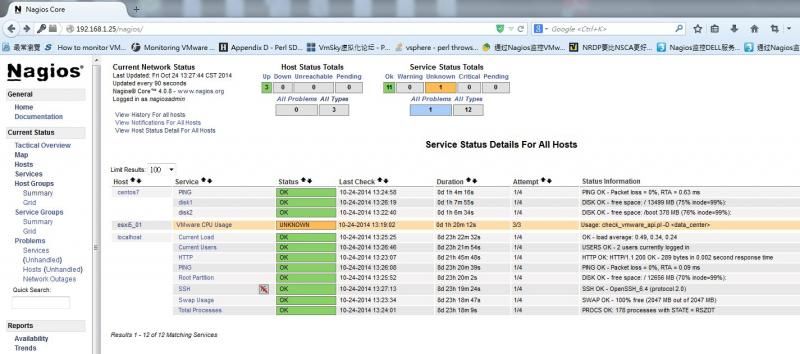
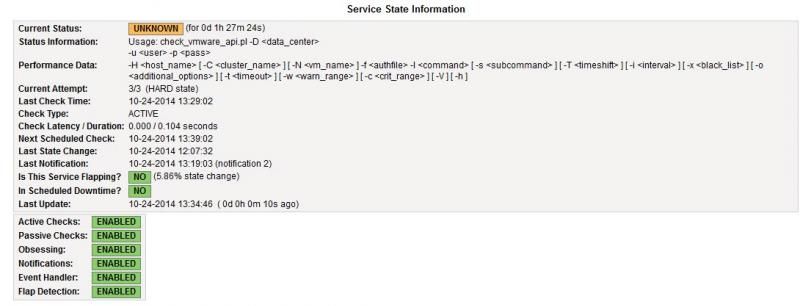
please help me to fix this error
thanks
check_vmware_api.pl Website:
http://www.op5.org/community/plugin-inventory/plugins
my os:centos7
my nagios:4.08
i can use commnad line to get esxi status
but list error at website
[root@localhost libexec]# ./check_vmware_api.pl -H 192.168.1.171 -u root -p XXXXX -l cpu
CHECK_VMWARE_API.PL OK - cpu usage=182.00 MHz (3.04%) | cpu_usagemhz=182.00MHz;; cpu_usage=3.04%;;
[root@localhost libexec]# ./check_vmware_api.pl -H 192.168.1.171 -u root -p XXXXX -l vmfs
CHECK_VMWARE_API.PL OK - Storages : 'datastore1'(free)=4096.00 MB (80.00%), 'nas'(free)=128635.00 MB (25.14%) | datastore1=4096.00MB;; nas=128635.00MB;;
[root@localhost libexec]# ./check_vmware_api.pl -H 192.168.1.171 -u root -p XXXXX -l mem
CHECK_VMWARE_API.PL OK - mem usage=954.28 MB (46.60%), overhead=260.29 MB, swapped=0.00 MB, memctl=0.00 MB | mem_usagemb=954.28MB;; mem_usage=46.60%;; mem_overhead=260.29MB;; mem_swap=0.00MB;; mem_memctl=0.00MB;;
[root@localhost libexec]#
my commnad.cfg
#check_vmware_api_host_cpu_usage' command definition
define command{
command_name check_vmware_api_host_cpu_usage
command_line $USER1$/check_vmware_api.pl -H $HOSTADDRESS$ -u $USER11$ -p $USER12$ -I cpu -s usage -w $ARG1$ -c $ARG2$
}
esxi5_01.cfg
# Define a host for the local machine
define host{
use esxi-server ; Name of host template$
; This host definition$
; in (or inherited by)$
host_name esxi5_01
alias esxi5_01
address 192.168.1.171
contact_groups admins
}
# Define an optional hostgroup for Linux machines
define hostgroup{
hostgroup_name esxi-servers ; The name of the hostgroup
alias VMWARE Servers ; Long name of the group
members esxi5_01 ; Comma separated list of hosts that belo$
}
define service{
use local-service
host_name esxi5_01
service_description VMware CPU Usage
check_command check_vmware_api_host_cpu_usage!80!90
}
i run /usr/local/nagios/bin/nagios -v /usr/local/nagios/etc/nagios.cfg
Nagios Core 4.0.8
Copyright (c) 2009-present Nagios Core Development Team and Community Contributors
Copyright (c) 1999-2009 Ethan Galstad
Last Modified: 08-12-2014
License: GPL
Website: http://www.nagios.org
Reading configuration data...
Read main config file okay...
Read object config files okay...
Running pre-flight check on configuration data...
Checking objects...
Checked 12 services.
Checked 3 hosts.
Checked 2 host groups.
Checked 0 service groups.
Checked 2 contacts.
Checked 1 contact groups.
Checked 67 commands.
Checked 5 time periods.
Checked 0 host escalations.
Checked 0 service escalations.
Checking for circular paths...
Checked 3 hosts
Checked 0 service dependencies
Checked 0 host dependencies
Checked 5 timeperiods
Checking global event handlers...
Checking obsessive compulsive processor commands...
Checking misc settings...
Total Warnings: 0
Total Errors: 0
Things look okay - No serious problems were detected during the pre-flight check
but when i use http://192.168.1.25/nagios/ and login
list error


please help me to fix this error
thanks
