Page 1 of 2
check_esx3.pl problem
Posted: Thu Nov 20, 2014 6:25 am
by rhassing
We are using the script check_esx3.pl to monitor the ESX environment.
For one customer we have some troubles when we use this script, sometimes we get a timeout:
Code: Select all
[root@mona plugins]# ./check_esx3 -H 172.25.1.1 -u user -p password -l cpu -s usage -w 80 -c 90 -vvv
[extra-opts] check_esx3 -H 172.25.1.1 -u user -p password -l cpu -s usage -w 80 -c 90 -vvv
CHECK_ESX3 OK - cpu usage=14.68 % | cpu_usage=14.68%;80;90
[root@mona plugins]# date
Mon Nov 17 09:24:41 CET 2014
[root@mona plugins]#

[root@mona plugins]# ./check_esx3 -H 172.25.1.1 -u user -p password -l cpu -s usage -w 80 -c 90 -vvv
[extra-opts] check_esx3 -H 172.25.1.1 -u root -p password -l cpu -s usage -w 80 -c 90 -vvv
CHECK_ESX3 CRITICAL - SOAP request error - possibly a protocol issue: 500 SSL read timeout:

[root@mona plugins]# date
Thu Nov 20 10:51:21 CET 2014
[root@mona plugins]#
We use this script for multiple sites and only at this site we are experiencing problems.
Is this a known problem, or is it something with a certain build of the ESX kernel?
The ESX build lever is:
Brgds,
Rob
Re: check_esx3.pl problem
Posted: Thu Nov 20, 2014 6:10 pm
by scottwilkerson
This isn't a know issue that I've seen before, but here's something you can test as a start, can you access this machine via the SSL interface?
Re: check_esx3.pl problem
Posted: Fri Nov 21, 2014 3:56 am
by rhassing
That seems to work, if I add "--insecure"...
Code: Select all
[rhg@mona ~]$ curl "https://172.25.1.1/" --insecure
<!DOCTYPE HTML PUBLIC "-//W3C//DTD HTML 4.01//EN" "http://www.w3.org/TR/html4/strict.dtd">

<html lang="en">
<head>
<meta http-equiv="content-type" content="text/html; charset=utf8">
<script type="text/javascript" src="./default.js"></script>
<script type="text/javascript" src="./en/welcomeRes.js"></script>
<script type="text/javascript" src="./watermark.js"></script>
<script type="text/javascript" src="./dyndata.js"></script>
<script type="text/javascript">document.write("<title>" + ID_EESX_Welcome + "</title>");</script>

<link rel="stylesheet" href="./default.css" type="text/css" />
<link rel="stylesheet" href="./print.css" type="text/css" media="print" />

<meta name="description" content="VMware ESXi is virtual infrastructure software for partitioning, consolidating, and managing systems in mission-critical environments. VMware ESXi provides a highly scalable virtual machine platform with advanced resource management capabilities, which can be managed by VMware vCenter Server.">
</head>

<body>
<div id="main">

   <div id="header">
      <h1><script type="text/javascript">document.write(ID_EESX);</script></h1>
      <h2><script type="text/javascript">document.write(ID_Welcome);</script></h2>
   </div>

   <div id="body">
      <div id="content">
         <h3><script type="text/javascript">document.write(ID_GettingStarted);</script></h3>

         <p><script type="text/javascript">document.write(ID_ESX_VIClientDesc);</script></p>

         <ul>
            <li><script type="text/javascript">
               document.write('<a href="http://vsphereclient.vmware.com/vsphereclient/1/6/1/8/0/7/1/VMware-viclient-all-5.5.0-1618071.exe">' + ID_DownloadVIClient + '</a>');
            </script></li>
         </ul>

         <script type="text/javascript">
            var c = ID_ESX_VCServerDesc;
            var u = 'http://www.vmware.com/info?id=1125';
            var t = ID_DownloadVCServer;

            if (null != ID_OemVcLink[ID_ResourceLang]) {
               if (ID_OemVcLink[ID_ResourceLang].url.length > 0) {
                  u = ID_OemVcLink[ID_ResourceLang].url;
               }

               if (ID_OemVcLink[ID_ResourceLang].context.length > 0) {
                  c = ID_OemVcLink[ID_ResourceLang].context;
               }

               if (ID_OemVcLink[ID_ResourceLang].text.length > 0) {
                  t = ID_OemVcLink[ID_ResourceLang].text;
               }
            }

            document.write('<p>' + c + '</p>');
            document.write('<ul><li><a href="' + u + '">' + t + '</a></li></ul>');
         </script>

         <p><script type="text/javascript">document.write(ID_DocDesc);</script></p>

         <ul>
            <li><a href="http://www.vmware.com/info?id=1272"><script type="text/javascript">document.write(ID_DownloadDoc);</script></a></li>
         </ul>

         <script type="text/javascript">
            if (null != ID_OemLink[ID_ResourceLang]) {
               document.write('<p>' + ID_OemLink[ID_ResourceLang].context + '</p>');
               document.write('<ul><li><a href="' + ID_OemLink[ID_ResourceLang].url + '">'+ ID_OemLink[ID_ResourceLang].text +'</a></li></ul>');
            }
         </script>
      </div>
   </div>

   <hr class="hide" />

   <div id="sidebar">
      <h3><script type="text/javascript">document.write(ID_ForAdmins);</script></h3>

      <h4><script type="text/javascript">document.write(ID_VIRCLI);</script></h4>

      <p><script type="text/javascript">document.write(ID_VIRCLIDesc);</script></p>

      <ul>
         <li><script type="text/javascript">document.write('<a href="https://www.vmware.com/support/developer/vcli/">'+ ID_DownloadVIRCLIAppliance +'</a>');</script></li>
         <li><script type="text/javascript">document.write('<a href="https://www.vmware.com/support/developer/vcli/">'+ ID_DownloadVIRCLIWindows +'</a>');</script></li>
         <li><script type="text/javascript">document.write('<a href="https://www.vmware.com/support/developer/vcli/">'+ ID_DownloadVIRCLILinux +'</a>');</script></li>
      </ul>

      <h4><script type="text/javascript">document.write(ID_VIDatacenters);</script></h4>

      <p><script type="text/javascript">document.write(ID_VIDatacentersDesc);</script></p>

      <ul>
         <li><script type="text/javascript">document.write('<a href="/folder?dcPath=ha-datacenter">'+ ID_BrowseHostDatastores +'</a>');</script></li>
      </ul>

      <h3><script type="text/javascript">document.write(ID_ForDevs);</script></h3>

      <h4><script type="text/javascript">document.write(ID_VISDK);</script></h4>

      <p><script type="text/javascript">document.write(ID_VISDKDesc);</script></p>

      <ul>
         <li><script type="text/javascript">document.write('<a href="http://www.vmware.com/info?id=928">'+ ID_DownloadSDK +'</a>');</script></li>
         <li><script type="text/javascript">document.write('<a href="/mob/">'+ ID_BrowseHost +'</a>');</script></li>
      </ul>
   </div>

   <hr class="hide" />

   <div id="footer">
      <p><script type="text/javascript">document.write(ID_CopyrightText);</script></p>

      <p><script type="text/javascript">document.write(ID_TrademarkText);</script></p>

      <p><script type="text/javascript">document.write(ID_AboutOSSDesc);</script></p>
   </div>
</div>

</body>
</html>
[rhg@mona ~]$
Re: check_esx3.pl problem
Posted: Fri Nov 21, 2014 2:45 pm
by sreinhardt
Lets try increasing timeout, see if those help out. It seems to me that the link to the server might have a bit of intermittent network latency causing issues that may not occur without SSL overhead, but thats largely speculation on your error messages at this point.
./check_esx3 -H 172.25.1.1 -u user -p password -l cpu -s usage -w 80 -c 90 -vvv -t 90
Re: check_esx3.pl problem
Posted: Fri Nov 21, 2014 3:31 pm
by rhassing
The extra time gives us the same output (error)

I have made 2 screenshots of the ping RTA data and the trend of this check.:
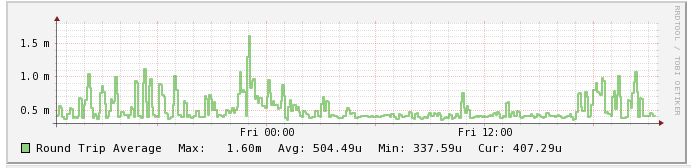
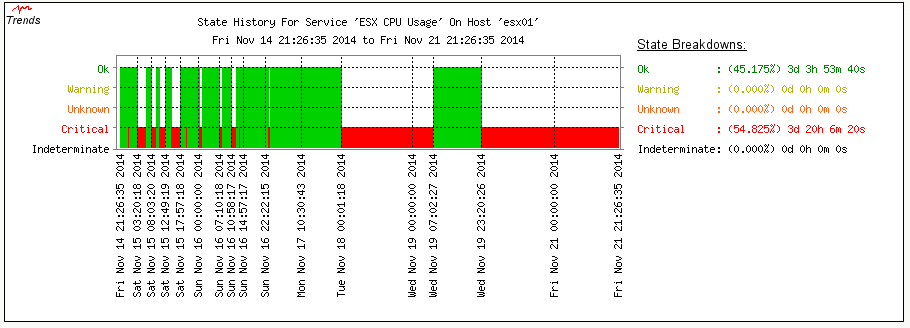
I don't think it's a network related problem
Re: check_esx3.pl problem
Posted: Fri Nov 21, 2014 3:35 pm
by sreinhardt
/me sees single digit ms response time....
Ya not really a network issue. Has that server been updated for heartbleed\poodle fixes with vmware updates?
Re: check_esx3.pl problem
Posted: Fri Nov 21, 2014 3:59 pm
by rhassing
I'm not sure if it has had all the updates, I do not maintain this server. I need to ask. But I think it has, as it is a rather new installation.
Re: check_esx3.pl problem
Posted: Fri Nov 21, 2014 4:26 pm
by rhassing
Code: Select all
[root@mona ~]# ./ssltest.py 172.25.1.1
Connecting...
Sending Client Hello...
Waiting for Server Hello...
 ... received message: type = 22, ver = 0302, length = 54
 ... received message: type = 22, ver = 0302, length = 1024
 ... received message: type = 22, ver = 0302, length = 4
Sending heartbeat request...
Unexpected EOF receiving record header - server closed connection
No heartbeat response received, server likely not vulnerable
Re: check_esx3.pl problem
Posted: Mon Nov 24, 2014 5:05 pm
by tmcdonald
Looks like it might be a known issue:
http://kb.vmware.com/selfservice/micros ... Id=2079732
Search for "PR 1239938"
If that is the case then updating VMWare might be the solution.
Re: check_esx3.pl problem
Posted: Tue Nov 25, 2014 5:42 pm
by rhassing
We are planning to upgrade the ESX servers. I will let you if it helps.
