Page 1 of 1
VMWare Services and Processes check
Posted: Wed Feb 18, 2015 9:25 am
by mwasc
Hey Guys,
we are using the check_esx3 vmware plugin to monitor our virtual machines. Now we see Memory, Network, CPU ...
Is there any possibility to monitor some processes or services of the virtual machines, like "spoolsv.exe"?
Re: VMWare Services and Processes check
Posted: Wed Feb 18, 2015 1:56 pm
by lmiltchev
You can monitor the services, for example:
Code: Select all
[root@testbox libexec]# /usr/local/nagios/libexec/check_esx3.pl -H "x.x.x.x" -f "/usr/local/nagiosxi/etc/components/vmware/x.x.x.x_auth.txt" -l "SERVICE"
ESX3 OK - services : DCUI (up), TSM (down), TSM-SSH (up), lbtd (up), lsassd (down), lwiod (down), netlogond (down), ntpd (up), sfcbd-watchdog (up), vpxa (up)
If you need to specify a single service, you can use a sub-command:
Code: Select all
[root@testbox libexec]# /usr/local/nagios/libexec/check_esx3.pl -H "x.x.x.x" -f "/usr/local/nagiosxi/etc/components/vmware/x.x.x.x_auth.txt" -l "SERVICE" -s ntpd
ESX3 OK - All services are in their apropriate state.
Re: VMWare Services and Processes check
Posted: Fri Feb 20, 2015 4:38 am
by mwasc
Thank you, but thats not what I'm looking for.
I'm looking for a function, like this one:
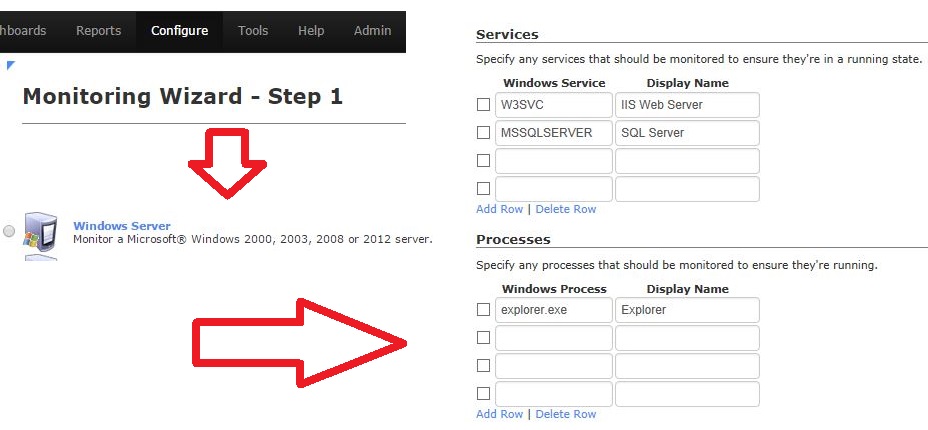
Is there any possibility to monitor Services and Processes for a virtual Windows Server by using the VMWare-Plugin?
Re: VMWare Services and Processes check
Posted: Fri Feb 20, 2015 10:05 am
by tgriep
The VMWare plugin doesn't have the capability to monitor services on a Windows Host.
You would have to use the Windows Server monitoring wizard to do that.
Re: VMWare Services and Processes check
Posted: Mon Feb 23, 2015 2:00 am
by mwasc
OK,
Thank You
Re: VMWare Services and Processes check
Posted: Mon Feb 23, 2015 11:56 am
by tmcdonald
Are we all set to close this up?