Page 1 of 3
Monitor Webpage without checking keyword
Posted: Thu Apr 16, 2015 2:29 pm
by scheema31
Hi
i am using the check_http command to monitor my websites and it requires a value to read on the page.
i have an issue where that value shows up for only for a split second and then i get the prompt for authentication.
how can i skip the checking of a value on the page?
command_line /usr/local/nagios/libexec/check_http -S -H $ARG1$ -p 443 -u $ARG3$ --regex=$ARG2$ -a -w 3 -c 5 -t 10
thanks,
Re: Monitor Webpage without checking keyword
Posted: Thu Apr 16, 2015 2:55 pm
by jdalrymple
keyword is totally optional:
Code: Select all
[root@localhost libexec]# ./check_http -H www.google.com
HTTP OK: HTTP/1.1 200 OK - 20656 bytes in 0.134 second response time |time=0.134271s;;;0.000000 size=20656B;;;0
Re: Monitor Webpage without checking keyword
Posted: Thu Apr 16, 2015 3:03 pm
by ssax
You can also test for the Authentication Required prompt text (mine returns Nagios Access, see screenshot):
Code: Select all
./check_http -H www.yourserver.com --regex=Access
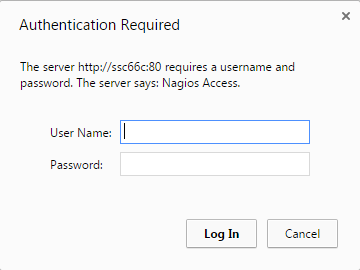
- authbox.png (6.77 KiB) Viewed 4314 times
Re: Monitor Webpage without checking keyword
Posted: Thu Apr 16, 2015 3:11 pm
by scheema31
thanks for the quick reply ssax.
i used that commnad but i still get an error "Name or service not known HTTP CRITICAL - Unable to open TCP socket"
here is my command: command_line /usr/local/nagios/libexec/check_http -H -S -p 443 (in my commands.cfg file)
and here is the usage of the command in the windows.cfg file:
define service{
use pager_generic-service
host_name sv-baysvn-01.baynet.local
service_description -
https://svn.bayleaf.com -
check_command check_https_plain!svn.bayleaf.com!
thanks,
Re: Monitor Webpage without checking keyword
Posted: Thu Apr 16, 2015 3:34 pm
by jdalrymple
Does your svn server use basic http auth? If so, can you try specifying a valid username/password combination in the URL using the following syntax:
Re: Monitor Webpage without checking keyword
Posted: Thu Apr 16, 2015 3:37 pm
by scheema31
i can get this working on the server via command line but how do i set this up in the windows.cfg and windows.cfg files?
thanks,
Re: Monitor Webpage without checking keyword
Posted: Thu Apr 16, 2015 4:03 pm
by jdalrymple
usr/local/nagios/libexec/check_http -S -H $ARG1$ -p 443 -u $ARG3$ --regex=$ARG2$ -a -w 3 -c 5 -t 10
You should have a service definition line:
If that doesn't work, show us what your current service definition looks like that "kind of works" and we'll fix it.
Re: Monitor Webpage without checking keyword
Posted: Thu Apr 16, 2015 4:14 pm
by scheema31
here is how i have this setup
Commands file (/usr/local/nagios/etc/objects/commands.cfg)
define command{
command_name check_https_plain
command_line /usr/local/nagios/libexec/check_http -S -H $ARG1$ -p 443 -u $ARG3$ --regex=$ARG2$ -a -w 3 -c 5 -t 10
}
Check file (/usr/local/nagios/etc/windows.cfg)
define service{
use pager_generic-service
host_name sv-baysvn-01.baynet.local
service_description -
https://svn.bayleaf.com -
check_command check_http_plain!
https://scheema:*******@svn.bayleaf.com!
}
thanks,
Re: Monitor Webpage without checking keyword
Posted: Thu Apr 16, 2015 4:17 pm
by scheema31
when i ran the command straight on the server it works fine:
[root@svhomermon02 libexec]# ./check_http -S -H svn.bayleaf.com -a scheema:*******
HTTP OK: HTTP/1.1 200 OK - 627 bytes in 0.029 second response time |time=0.028971s;;;0.000000 size=627B;;;0
thanks,
Re: Monitor Webpage without checking keyword
Posted: Thu Apr 16, 2015 4:32 pm
by jdalrymple
Try this then:
Code: Select all
define command{
	command_name					check_https_plain
	command_line					/usr/local/nagios/libexec/check_http -S -H $ARG1$ -a $ARG2$
}

define service{
	use 							pager_generic-service
	host_name 						sv-baysvn-01.baynet.local
	service_description				https://svn.bayleaf.com -
	check_command 					check_https_plain!svn.bayleaf.com!scheema:*******
}