Page 1 of 1
MS SQL Monitoring
Posted: Tue Sep 13, 2011 12:37 am
by jbmaliwat
Hi,
Does anyone here encountered the same problem.
Please see below.
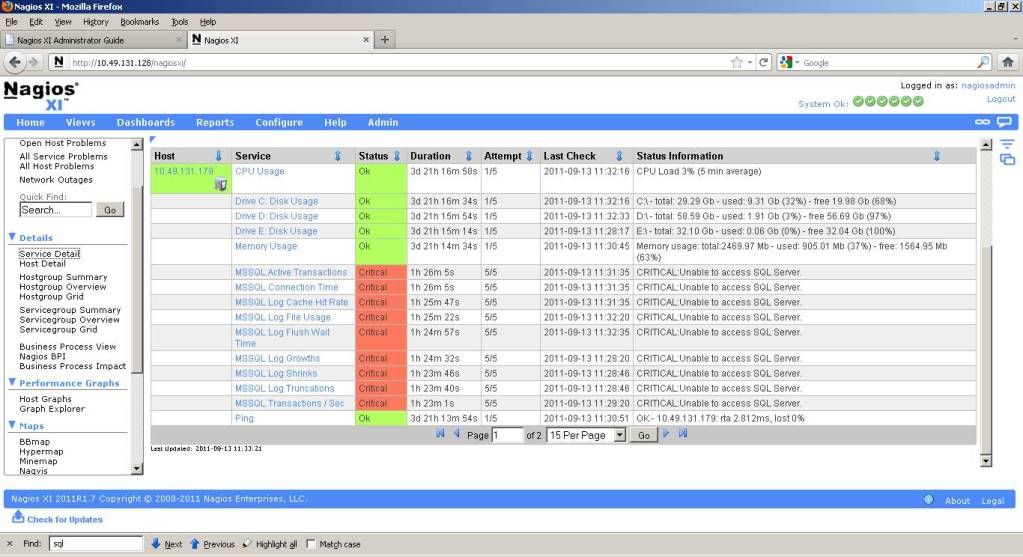
Can anyone help me how to solve this problem? Why it goes critical. I have already installed the agent for Windows, where my MS SQL is running.
What other things should I do, to successfully monitor my MS SQL.
Thank you,
John Benedict Z. Maliwat
Junior Technical Support Engineer
Manila, Philippines
Re: MS SQL Monitoring
Posted: Tue Sep 13, 2011 10:53 am
by nscott
You need to make sure your MSSQL server is allowing TCP/IP and SQL authentication.
For TCP connections this is a good tutorial to follow:
http://plutonium.cs.umanitoba.ca/ntlabs ... -home.html
If thats not fixing it, I would Google for 'MSSQL <your version of MSSQL> IP' to find more articles as it varies a little bit for each different version.
Then you'll also need to enable SQL authentication, again, here is a good reference for that:
http://eduzine.edujini-labs.com/archive ... ation.html
After that you should be able to connect to it using the credentials you specified.
Re: MS SQL Monitoring
Posted: Wed Sep 14, 2011 3:42 am
by jbmaliwat
It still goes the same error
Re: MS SQL Monitoring
Posted: Wed Sep 14, 2011 10:59 am
by nscott
jbalmiwat,
It can vary pretty significantly from MSSQL server to MSSQL server, so I"d recommed dropping down to the command line and going to /usr/local/nagios/libexec and running the plugin manually til you find the correct login credentials:
./check_mssql_server -H <IP of MSSQL> -U <user with SELECT access on master and temp> -P <password for said user> -p <port open on MSSQL server>
This is the quickest way to diagnose connectivity issues with the MSSQL database.
Re: MS SQL Monitoring
Posted: Wed Sep 14, 2011 8:23 pm
by jbmaliwat
Hi Sir,
Correction: jbmaliwat sir..

Ok sir, I will try this one. Thank you
Re: MS SQL Monitoring
Posted: Fri Sep 16, 2011 3:16 pm
by nscott
Sorry about the name, my mistake.