Page 1 of 2
Availability reports and Trends incomplete data
Posted: Thu Feb 23, 2017 4:59 pm
by jfla011
Hi,
I've been running Nagios for several years, and I have found that recently (past 6-12 months) the availability reports and trends reports only show data for the last 7 days for some hosts. For example, if I run an availability report for the current month, for host OCLWDASA01, it will show the previous 7 days up, and everything else as "Time Undetermined". This is not a new host, it has been monitored actively since 2015. Here are entries for the host from the /usr/local/nagios/var/archive/nagios-02-17-2017-00.log file.
Code: Select all
-rw-r--r--. 1 nagios nagios 443M Feb 16 23:59 nagios-02-17-2017-00.log
-rw-r--r--. 1 nagios nagios 1.1M Feb 17 23:59 nagios-02-18-2017-00.log
-rw-r--r--. 1 nagios nagios 1.1M Feb 18 23:59 nagios-02-19-2017-00.log
-rw-r--r--. 1 nagios nagios 1.3M Feb 19 23:59 nagios-02-20-2017-00.log
-rw-r--r--. 1 nagios nagios 985K Feb 20 23:58 nagios-02-21-2017-00.log
-rw-r--r--. 1 nagios nagios 1.1M Feb 21 23:59 nagios-02-22-2017-00.log
-rw-r--r--. 1 nagios nagios 1.4M Feb 22 23:59 nagios-02-23-2017-00.log
-rw-r--r--. 1 nagios nagios 2.6M Feb 23 23:59 nagios-02-24-2017-00.log
Code: Select all
[root@oclvssm01 archives]# grep "HOST ALERT: OCLWDASA01" *
nagios-02-17-2017-00.log:[1455715240] HOST ALERT: OCLWDASA01;DOWN;SOFT;1;CRITICAL - Host Unreachable (192.168.10.1)
nagios-02-17-2017-00.log:[1455715265] HOST ALERT: OCLWDASA01;DOWN;SOFT;2;CRITICAL - Host Unreachable (192.168.10.1)
nagios-02-17-2017-00.log:[1455715328] HOST ALERT: OCLWDASA01;UP;SOFT;3;PING OK - Packet loss = 0%, RTA = 0.49 ms
nagios-02-17-2017-00.log:[1455719887] HOST ALERT: OCLWDASA01;DOWN;SOFT;1;CRITICAL - Host Unreachable (192.168.10.1)
nagios-02-17-2017-00.log:[1455719950] HOST ALERT: OCLWDASA01;DOWN;SOFT;2;CRITICAL - Host Unreachable (192.168.10.1)
nagios-02-17-2017-00.log:[1455720012] HOST ALERT: OCLWDASA01;DOWN;SOFT;3;CRITICAL - Host Unreachable (192.168.10.1)
nagios-02-17-2017-00.log:[1455720076] HOST ALERT: OCLWDASA01;UP;SOFT;4;PING OK - Packet loss = 0%, RTA = 0.59 ms
nagios-02-17-2017-00.log:[1455840145] HOST ALERT: OCLWDASA01;DOWN;SOFT;1;CRITICAL - Host Unreachable (192.168.10.1)
nagios-02-17-2017-00.log:[1455840207] HOST ALERT: OCLWDASA01;DOWN;SOFT;2;CRITICAL - Host Unreachable (192.168.10.1)
nagios-02-17-2017-00.log:[1455840269] HOST ALERT: OCLWDASA01;DOWN;SOFT;3;CRITICAL - Host Unreachable (192.168.10.1)
nagios-02-17-2017-00.log:[1455840333] HOST ALERT: OCLWDASA01;UP;SOFT;4;PING OK - Packet loss = 0%, RTA = 0.60 ms
nagios-02-17-2017-00.log:[1456073510] HOST ALERT: OCLWDASA01;DOWN;SOFT;1;(Host check timed out after 30.01 seconds)
nagios-02-17-2017-00.log:[1456073580] HOST ALERT: OCLWDASA01;UP;SOFT;2;PING OK - Packet loss = 79%, RTA = 0.79 ms
nagios-02-17-2017-00.log:[1457590736] HOST ALERT: OCLWDASA01;DOWN;SOFT;1;(Host check timed out after 30.01 seconds)
nagios-02-17-2017-00.log:[1457590790] HOST ALERT: OCLWDASA01;UP;SOFT;2;PING WARNING - Packet loss = 80%, RTA = 0.55 ms
nagios-02-17-2017-00.log:[1457601355] HOST ALERT: OCLWDASA01;DOWN;SOFT;1;PING CRITICAL - Packet loss = 100%
nagios-02-17-2017-00.log:[1457601415] HOST ALERT: OCLWDASA01;DOWN;SOFT;2;PING CRITICAL - Packet loss = 100%
nagios-02-17-2017-00.log:[1457601462] HOST ALERT: OCLWDASA01;UP;SOFT;3;PING OK - Packet loss = 72%, RTA = 0.52 ms
As you can see, there has not been a host down or host up alert for this host since "1457601462" which is March 2016.
Here is the availability report for "This Month"
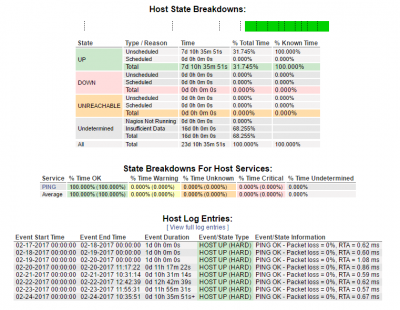
- Here is the availability report for "This Month"
Here is the trend report for the same host, same time period.
Would really like to get these reports to be accurate. Thanks.
Re: Availability reports and Trends incomplete data
Posted: Fri Feb 24, 2017 11:33 am
by mcapra
Can you share the outputs of the following commands executed from the CLI of your Nagios Core machine:
Code: Select all
ls -al /usr/local/nagios/var/archive/
ls -al /usr/local/nagios/var/
cat /usr/local/nagios/etc/nagios.cfg | grep log_archive_path
grep '' /etc/logrotate.d/*
cat /etc/logrotate.conf
/usr/local/nagios/bin/nagios -V
Re: Availability reports and Trends incomplete data
Posted: Sun Feb 26, 2017 9:05 pm
by jfla011
Hi,
I don't have logrotate running on Nagios logs, all the old log entries from 2015 onwards are in the /usr/local/nagios/var/archives/nagios-02-17-2017-00.log file. This is from when I rebuilt Nagios from scratch (new VM) using version 4. Our previous Nagios VM was running some flavour of Nagios Core 3
I upgraded from 4.1.0 to 4.2.4 on February 17th.
Here are all the outputs.
Code: Select all
[root@oclvssm01 ~]# ls -al /usr/local/nagios/var/archives/
total 468564
drwxrwxr-x. 2 nagios nagios      4096 Feb 26 23:59 .
drwxrwxr-x. 5 nagios nagios      4096 Feb 27 14:52 ..
-rw-r--r--. 1 nagios nagios 464043330 Feb 16 23:59 nagios-02-17-2017-00.log
-rw-r--r--. 1 nagios nagios   1096175 Feb 17 23:59 nagios-02-18-2017-00.log
-rw-r--r--. 1 nagios nagios   1084409 Feb 18 23:59 nagios-02-19-2017-00.log
-rw-r--r--. 1 nagios nagios   1291854 Feb 19 23:59 nagios-02-20-2017-00.log
-rw-r--r--. 1 nagios nagios   1008315 Feb 20 23:58 nagios-02-21-2017-00.log
-rw-r--r--. 1 nagios nagios   1049804 Feb 21 23:59 nagios-02-22-2017-00.log
-rw-r--r--. 1 nagios nagios   1450047 Feb 22 23:59 nagios-02-23-2017-00.log
-rw-r--r--. 1 nagios nagios   2634777 Feb 23 23:59 nagios-02-24-2017-00.log
-rw-r--r--. 1 nagios nagios   2709181 Feb 24 23:59 nagios-02-25-2017-00.log
-rw-r--r--. 1 nagios nagios   1644387 Feb 25 23:59 nagios-02-26-2017-00.log
-rw-r--r--. 1 nagios nagios   1679830 Feb 26 23:59 nagios-02-27-2017-00.log
Code: Select all
[root@oclvssm01 ~]# ls -al /usr/local/nagios/var/
total 11284000
drwxrwxr-x. 5 nagios nagios       4096 Feb 27 14:54 .
drwxr-xr-x. 9 root   root           87 Feb 14 14:47 ..
drwxrwxr-x. 2 nagios nagios       4096 Feb 26 23:59 archives
-rw-r--r--. 1 nagios nagios 1519349888 Feb 27 14:54 host-perfdata
-rw-r--r--. 1 nagios nagios 1484396161 Feb 27 14:54 host-perfdata.out
-rw-r--r--. 1 nagios nagios         34 Feb 27 14:48 nagios.configtest
-rw-r--r--. 1 nagios nagios          5 Feb 27 14:48 nagios.lock
-rw-r--r--. 1 nagios nagios    1502353 Feb 27 14:54 nagios.log
-rw-rw-r--. 1 nagios nagios     610840 Feb  2 11:43 nagios.tmpOhEyWN
-rw-r--r--. 1 nagios nagios     538168 Feb 27 14:48 objects.cache
-rw-r--r--. 1 nagios nagios     538168 Feb 27 14:48 objects.precache
-rw-------. 1 nagios nagios     876842 Feb 27 14:48 retention.dat
drwxrwsr-x. 2 nagios nagcmd         39 Feb 27 14:48 rw
-rw-r--r--. 1 nagios nagios 4075656577 Feb 27 14:54 service-perfdata
-rw-r--r--. 1 nagios nagios 4468663392 Feb 27 14:54 service-perfdata.out
drwxr-xr-x. 3 nagios nagios         25 Aug 19  2015 spool
-rw-rw-r--. 1 nagios nagios     895740 Feb 27 14:54 status.dat
Code: Select all
[root@oclvssm01 ~]# cat /usr/local/nagios/etc/nagios.cfg | grep log_archive_path
log_archive_path=/usr/local/nagios/var/archives
Code: Select all
[root@oclvssm01 ~]# grep '' /etc/logrotate.d/*
/etc/logrotate.d/cento:/var/log/cento/*.log {
/etc/logrotate.d/cento: daily
/etc/logrotate.d/cento: missingok
/etc/logrotate.d/cento: rotate 4
/etc/logrotate.d/cento: copytruncate
/etc/logrotate.d/cento:}
/etc/logrotate.d/cento:
/etc/logrotate.d/disk2n:/var/log/disk2n/*.log {
/etc/logrotate.d/disk2n:        daily
/etc/logrotate.d/disk2n:        missingok
/etc/logrotate.d/disk2n:        rotate 4
/etc/logrotate.d/disk2n:        copytruncate
/etc/logrotate.d/disk2n:}
/etc/logrotate.d/disk2n:
/etc/logrotate.d/httpd:/var/log/httpd/*log {
/etc/logrotate.d/httpd:    missingok
/etc/logrotate.d/httpd:    notifempty
/etc/logrotate.d/httpd:    sharedscripts
/etc/logrotate.d/httpd:    delaycompress
/etc/logrotate.d/httpd:    postrotate
/etc/logrotate.d/httpd:        /bin/systemctl reload httpd.service > /dev/null 2>/dev/null || true
/etc/logrotate.d/httpd:    endscript
/etc/logrotate.d/httpd:}
/etc/logrotate.d/mariadb:# This logname can be set in /etc/my.cnf
/etc/logrotate.d/mariadb:# by setting the variable "log-error"
/etc/logrotate.d/mariadb:# in the [mysqld_safe] section as follows:
/etc/logrotate.d/mariadb:#
/etc/logrotate.d/mariadb:# [mysqld_safe]
/etc/logrotate.d/mariadb:# log-error=/var/log/mariadb/mariadb.log
/etc/logrotate.d/mariadb:#
/etc/logrotate.d/mariadb:# If the root user has a password you have to create a
/etc/logrotate.d/mariadb:# /root/.my.cnf configuration file with the following
/etc/logrotate.d/mariadb:# content:
/etc/logrotate.d/mariadb:#
/etc/logrotate.d/mariadb:# [mysqladmin]
/etc/logrotate.d/mariadb:# password = <secret>
/etc/logrotate.d/mariadb:# user= root
/etc/logrotate.d/mariadb:#
/etc/logrotate.d/mariadb:# where "<secret>" is the password.
/etc/logrotate.d/mariadb:#
/etc/logrotate.d/mariadb:# ATTENTION: This /root/.my.cnf should be readable ONLY
/etc/logrotate.d/mariadb:# for root !
/etc/logrotate.d/mariadb:
/etc/logrotate.d/mariadb:# Then, un-comment the following lines to enable rotation of mysql's log file:
/etc/logrotate.d/mariadb:
/etc/logrotate.d/mariadb:#/var/log/mariadb/mariadb.log {
/etc/logrotate.d/mariadb:#        create 640 mysql mysql
/etc/logrotate.d/mariadb:#        notifempty
/etc/logrotate.d/mariadb:#      daily
/etc/logrotate.d/mariadb:#        rotate 3
/etc/logrotate.d/mariadb:#        missingok
/etc/logrotate.d/mariadb:#        compress
/etc/logrotate.d/mariadb:#    postrotate
/etc/logrotate.d/mariadb:#      # just if mysqld is really running
/etc/logrotate.d/mariadb:#      if test -x /usr/bin/mysqladmin && \
/etc/logrotate.d/mariadb:#         /usr/bin/mysqladmin ping &>/dev/null
/etc/logrotate.d/mariadb:#      then
/etc/logrotate.d/mariadb:#         /usr/bin/mysqladmin flush-logs
/etc/logrotate.d/mariadb:#      fi
/etc/logrotate.d/mariadb:#    endscript
/etc/logrotate.d/mariadb:#}
/etc/logrotate.d/n2disk:/var/log/n2disk/*.log {
/etc/logrotate.d/n2disk:        daily
/etc/logrotate.d/n2disk:        missingok
/etc/logrotate.d/n2disk:        rotate 4
/etc/logrotate.d/n2disk:        copytruncate
/etc/logrotate.d/n2disk:}
/etc/logrotate.d/n2disk:
/etc/logrotate.d/nprobe:/var/log/nprobe/*.log {
/etc/logrotate.d/nprobe:        daily
/etc/logrotate.d/nprobe:        missingok
/etc/logrotate.d/nprobe:        rotate 4
/etc/logrotate.d/nprobe:        copytruncate
/etc/logrotate.d/nprobe:}
/etc/logrotate.d/nprobe:
/etc/logrotate.d/ntopng:/var/log/ntopng/*.log {
/etc/logrotate.d/ntopng:        daily
/etc/logrotate.d/ntopng:        missingok
/etc/logrotate.d/ntopng:        rotate 4
/etc/logrotate.d/ntopng:        copytruncate
/etc/logrotate.d/ntopng:}
/etc/logrotate.d/ntopng:
/etc/logrotate.d/ppp:# Logrotate file for ppp RPM
/etc/logrotate.d/ppp:
/etc/logrotate.d/ppp:/var/log/ppp/connect-errors {
/etc/logrotate.d/ppp:   missingok
/etc/logrotate.d/ppp:   compress
/etc/logrotate.d/ppp:   notifempty
/etc/logrotate.d/ppp:   daily
/etc/logrotate.d/ppp:   rotate 5
/etc/logrotate.d/ppp:   create 0600 root root
/etc/logrotate.d/ppp:}
/etc/logrotate.d/redis:/var/log/redis/redis.log {
/etc/logrotate.d/redis:    weekly
/etc/logrotate.d/redis:    rotate 10
/etc/logrotate.d/redis:    copytruncate
/etc/logrotate.d/redis:    delaycompress
/etc/logrotate.d/redis:    compress
/etc/logrotate.d/redis:    notifempty
/etc/logrotate.d/redis:    missingok
/etc/logrotate.d/redis:}
/etc/logrotate.d/snmptt:/var/log/snmptt/snmptt*.log /var/log/snmptt/snmptthandler.debug {
/etc/logrotate.d/snmptt:    weekly
/etc/logrotate.d/snmptt:    notifempty
/etc/logrotate.d/snmptt:    missingok
/etc/logrotate.d/snmptt:}
/etc/logrotate.d/snmptt:
/etc/logrotate.d/snmptt:/var/log/snmptt/snmptt.debug {
/etc/logrotate.d/snmptt:    weekly
/etc/logrotate.d/snmptt:    notifempty
/etc/logrotate.d/snmptt:    missingok
/etc/logrotate.d/snmptt:    postrotate
/etc/logrotate.d/snmptt:        /etc/init.d/snmptt reload >/dev/null 2>/dev/null || true
/etc/logrotate.d/snmptt:    endscript
/etc/logrotate.d/snmptt:}
/etc/logrotate.d/syslog:/var/log/cron
/etc/logrotate.d/syslog:/var/log/maillog
/etc/logrotate.d/syslog:/var/log/messages
/etc/logrotate.d/syslog:/var/log/secure
/etc/logrotate.d/syslog:/var/log/spooler
/etc/logrotate.d/syslog:{
/etc/logrotate.d/syslog:    missingok
/etc/logrotate.d/syslog:    sharedscripts
/etc/logrotate.d/syslog:    postrotate
/etc/logrotate.d/syslog:        /bin/kill -HUP `cat /var/run/syslogd.pid 2> /dev/null` 2> /dev/null || true
/etc/logrotate.d/syslog:    endscript
/etc/logrotate.d/syslog:}
/etc/logrotate.d/wpa_supplicant:/var/log/wpa_supplicant.log {
/etc/logrotate.d/wpa_supplicant:    missingok
/etc/logrotate.d/wpa_supplicant:    notifempty
/etc/logrotate.d/wpa_supplicant:    size 30k
/etc/logrotate.d/wpa_supplicant:    create 0600 root root
/etc/logrotate.d/wpa_supplicant:}
/etc/logrotate.d/yum:/var/log/yum.log {
/etc/logrotate.d/yum:    missingok
/etc/logrotate.d/yum:    notifempty
/etc/logrotate.d/yum:    size 30k
/etc/logrotate.d/yum:    yearly
/etc/logrotate.d/yum:    create 0600 root root
/etc/logrotate.d/yum:}
Code: Select all
[root@oclvssm01 ~]# cat /etc/logrotate.conf
# see "man logrotate" for details
# rotate log files weekly
weekly

# keep 4 weeks worth of backlogs
rotate 4

# create new (empty) log files after rotating old ones
create

# use date as a suffix of the rotated file
dateext

# uncomment this if you want your log files compressed
#compress

# RPM packages drop log rotation information into this directory
include /etc/logrotate.d

# no packages own wtmp and btmp -- we'll rotate them here
/var/log/wtmp {
    monthly
    create 0664 root utmp
        minsize 1M
    rotate 1
}

/var/log/btmp {
    missingok
    monthly
    create 0600 root utmp
    rotate 1
}

# system-specific logs may be also be configured here.
Code: Select all
[root@oclvssm01 ~]# /usr/local/nagios/bin/nagios -V

Nagios Core 4.2.4
Copyright (c) 2009-present Nagios Core Development Team and Community Contributors
Copyright (c) 1999-2009 Ethan Galstad
Last Modified: 12-07-2016
License: GPL

Website: https://www.nagios.org
This program is free software; you can redistribute it and/or modify
it under the terms of the GNU General Public License version 2 as
published by the Free Software Foundation.

This program is distributed in the hope that it will be useful,
but WITHOUT ANY WARRANTY; without even the implied warranty of
MERCHANTABILITY or FITNESS FOR A PARTICULAR PURPOSE.  See the
GNU General Public License for more details.

You should have received a copy of the GNU General Public License
along with this program; if not, write to the Free Software
Foundation, Inc., 675 Mass Ave, Cambridge, MA 02139, USA.
Re: Availability reports and Trends incomplete data
Posted: Mon Feb 27, 2017 3:44 pm
by mcapra
The way Core works on the back-end to generate reports relies in part on the date that is in the log file's name (nagios-02-17-2017-00.log). I would try splitting that log file up into a few specific dates, as it was with the old installation, and see if that affects your reports in a meaningful way.
Re: Availability reports and Trends incomplete data
Posted: Mon Mar 06, 2017 11:07 pm
by jfla011
Hi,
Didn't seem to help. I split the file with the following command
Code: Select all
gawk -F"[][]" '{d=strftime("nagios-%m-%d-%Y-00.log", $2);print > d}' ~/test/nagios-02-17-2017-00.log
I've restarted nagios and tried running the reports again and getting the same issue.
Code: Select all
[root@oclvssm01 archives]# ls -lh *2017*
-rw-r--r--. 1 nagios nagios 2.0M Mar  7 16:54 nagios-01-01-2017-00.log
-rw-r--r--. 1 nagios nagios 1.8M Mar  7 16:54 nagios-01-02-2017-00.log
-rw-r--r--. 1 nagios nagios 1.6M Mar  7 16:54 nagios-01-03-2017-00.log
-rw-r--r--. 1 nagios nagios 1.3M Mar  7 16:54 nagios-01-04-2017-00.log
-rw-r--r--. 1 nagios nagios 1.2M Mar  7 16:54 nagios-01-05-2017-00.log
-rw-r--r--. 1 nagios nagios 943K Mar  7 16:54 nagios-01-06-2017-00.log
-rw-r--r--. 1 nagios nagios 906K Mar  7 16:54 nagios-01-07-2017-00.log
-rw-r--r--. 1 nagios nagios 913K Mar  7 16:54 nagios-01-08-2017-00.log
-rw-r--r--. 1 nagios nagios 804K Mar  7 16:54 nagios-01-09-2017-00.log
-rw-r--r--. 1 nagios nagios 1.1M Mar  7 16:54 nagios-01-10-2017-00.log
-rw-r--r--. 1 nagios nagios 632K Mar  7 16:54 nagios-01-11-2017-00.log
-rw-r--r--. 1 nagios nagios 532K Mar  7 16:54 nagios-01-12-2017-00.log
-rw-r--r--. 1 nagios nagios 476K Mar  7 16:54 nagios-01-13-2017-00.log
-rw-r--r--. 1 nagios nagios 569K Mar  7 16:54 nagios-01-14-2017-00.log
-rw-r--r--. 1 nagios nagios 445K Mar  7 16:54 nagios-01-15-2017-00.log
-rw-r--r--. 1 nagios nagios 501K Mar  7 16:54 nagios-01-16-2017-00.log
-rw-r--r--. 1 nagios nagios 707K Mar  7 16:54 nagios-01-17-2017-00.log
-rw-r--r--. 1 nagios nagios 407K Mar  7 16:54 nagios-01-18-2017-00.log
-rw-r--r--. 1 nagios nagios 587K Mar  7 16:54 nagios-01-19-2017-00.log
-rw-r--r--. 1 nagios nagios 740K Mar  7 16:54 nagios-01-20-2017-00.log
-rw-r--r--. 1 nagios nagios 782K Mar  7 16:54 nagios-01-21-2017-00.log
-rw-r--r--. 1 nagios nagios 516K Mar  7 16:54 nagios-01-22-2017-00.log
-rw-r--r--. 1 nagios nagios 771K Mar  7 16:54 nagios-01-23-2017-00.log
-rw-r--r--. 1 nagios nagios 752K Mar  7 16:54 nagios-01-24-2017-00.log
-rw-r--r--. 1 nagios nagios 736K Mar  7 16:54 nagios-01-25-2017-00.log
-rw-r--r--. 1 nagios nagios 788K Mar  7 16:54 nagios-01-26-2017-00.log
-rw-r--r--. 1 nagios nagios 788K Mar  7 16:54 nagios-01-27-2017-00.log
-rw-r--r--. 1 nagios nagios 604K Mar  7 16:54 nagios-01-28-2017-00.log
-rw-r--r--. 1 nagios nagios 861K Mar  7 16:54 nagios-01-29-2017-00.log
-rw-r--r--. 1 nagios nagios 959K Mar  7 16:54 nagios-01-30-2017-00.log
-rw-r--r--. 1 nagios nagios 966K Mar  7 16:54 nagios-01-31-2017-00.log
-rw-r--r--. 1 nagios nagios 866K Mar  7 16:54 nagios-02-01-2017-00.log
-rw-r--r--. 1 nagios nagios 987K Mar  7 16:54 nagios-02-02-2017-00.log
-rw-r--r--. 1 nagios nagios 1.2M Mar  7 16:54 nagios-02-03-2017-00.log
-rw-r--r--. 1 nagios nagios 1.2M Mar  7 16:54 nagios-02-04-2017-00.log
-rw-r--r--. 1 nagios nagios 1.3M Mar  7 16:54 nagios-02-05-2017-00.log
-rw-r--r--. 1 nagios nagios 1.2M Mar  7 16:54 nagios-02-06-2017-00.log
-rw-r--r--. 1 nagios nagios 1.5M Mar  7 16:54 nagios-02-07-2017-00.log
-rw-r--r--. 1 nagios nagios 1.4M Mar  7 16:54 nagios-02-08-2017-00.log
-rw-r--r--. 1 nagios nagios 1.2M Mar  7 16:54 nagios-02-09-2017-00.log
-rw-r--r--. 1 nagios nagios 1.3M Mar  7 16:54 nagios-02-10-2017-00.log
-rw-r--r--. 1 nagios nagios 1.1M Mar  7 16:54 nagios-02-11-2017-00.log
-rw-r--r--. 1 nagios nagios 973K Mar  7 16:54 nagios-02-12-2017-00.log
-rw-r--r--. 1 nagios nagios 1.4M Mar  7 16:54 nagios-02-13-2017-00.log
-rw-r--r--. 1 nagios nagios 1.2M Mar  7 16:54 nagios-02-14-2017-00.log
-rw-r--r--. 1 nagios nagios 1.1M Mar  7 16:54 nagios-02-15-2017-00.log
-rw-r--r--. 1 nagios nagios 1.1M Mar  7 16:54 nagios-02-16-2017-00.log
-rw-r--r--. 1 nagios nagios 1.1M Mar  7 16:53 nagios-02-18-2017-00.log
-rw-r--r--. 1 nagios nagios 1.1M Mar  7 16:53 nagios-02-19-2017-00.log
-rw-r--r--. 1 nagios nagios 1.3M Mar  7 16:53 nagios-02-20-2017-00.log
-rw-r--r--. 1 nagios nagios 985K Mar  7 16:53 nagios-02-21-2017-00.log
-rw-r--r--. 1 nagios nagios 1.1M Mar  7 16:53 nagios-02-22-2017-00.log
-rw-r--r--. 1 nagios nagios 1.4M Mar  7 16:53 nagios-02-23-2017-00.log
-rw-r--r--. 1 nagios nagios 2.6M Mar  7 16:53 nagios-02-24-2017-00.log
-rw-r--r--. 1 nagios nagios 2.6M Mar  7 16:53 nagios-02-25-2017-00.log
-rw-r--r--. 1 nagios nagios 1.6M Mar  7 16:53 nagios-02-26-2017-00.log
-rw-r--r--. 1 nagios nagios 1.7M Mar  7 16:53 nagios-02-27-2017-00.log
-rw-r--r--. 1 nagios nagios 3.1M Mar  7 16:53 nagios-02-28-2017-00.log
-rw-r--r--. 1 nagios nagios 3.7M Mar  7 16:53 nagios-03-01-2017-00.log
-rw-r--r--. 1 nagios nagios 2.2M Mar  7 16:53 nagios-03-02-2017-00.log
-rw-r--r--. 1 nagios nagios 1.4M Mar  7 16:53 nagios-03-03-2017-00.log
-rw-r--r--. 1 nagios nagios 2.0M Mar  7 16:53 nagios-03-04-2017-00.log
-rw-r--r--. 1 nagios nagios 1.6M Mar  7 16:53 nagios-03-05-2017-00.log
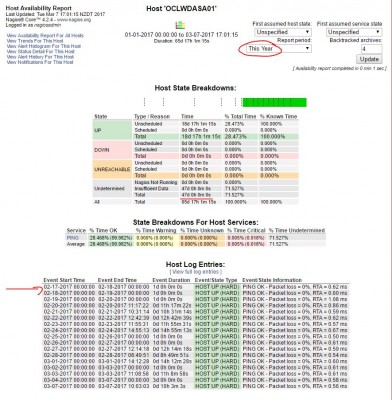
- Availability report
Re: Availability reports and Trends incomplete data
Posted: Tue Mar 07, 2017 4:47 pm
by ssax
Was the hostname ever changed? It's case-sensitive too.
Please attach the output of this command:
Code: Select all
grep -l OCLWDASA01 /usr/local/nagios/var/archvies/*
Thank you
Re: Availability reports and Trends incomplete data
Posted: Wed Mar 22, 2017 6:04 pm
by jfla011
Hi,
Sorry for the delay, I didn't get a notification there was a reply. Hostname has never been changed. Here is the output.
Code: Select all
[root@oclvssm01 archives]# grep -l OCLWDASA01 *
nagios-01-04-2017-00.log
nagios-01-05-2017-00.log
nagios-01-11-2017-00.log
nagios-01-15-2017-00.log
nagios-01-17-2017-00.log
nagios-01-18-2016-00.log
nagios-01-24-2017-00.log
nagios-01-27-2017-00.log
nagios-01-31-2017-00.log
nagios-02-02-2017-00.log
nagios-02-04-2017-00.log
nagios-02-09-2017-00.log
nagios-02-18-2016-00.log
nagios-02-18-2017-00.log
nagios-02-19-2016-00.log
nagios-02-19-2017-00.log
nagios-02-20-2017-00.log
nagios-02-21-2017-00.log
nagios-02-22-2016-00.log
nagios-02-22-2017-00.log
nagios-02-23-2017-00.log
nagios-02-24-2017-00.log
nagios-02-25-2017-00.log
nagios-02-26-2017-00.log
nagios-02-27-2017-00.log
nagios-02-28-2017-00.log
nagios-03-01-2017-00.log
nagios-03-02-2016-00.log
nagios-03-02-2017-00.log
nagios-03-03-2017-00.log
nagios-03-04-2016-00.log
nagios-03-04-2017-00.log
nagios-03-05-2017-00.log
nagios-03-08-2017-00.log
nagios-03-09-2017-00.log
nagios-03-10-2016-00.log
nagios-03-10-2017-00.log
nagios-03-11-2017-00.log
nagios-03-12-2017-00.log
nagios-03-13-2017-00.log
nagios-03-14-2017-00.log
nagios-03-15-2017-00.log
nagios-03-16-2017-00.log
nagios-03-17-2017-00.log
nagios-03-18-2017-00.log
nagios-03-19-2017-00.log
nagios-03-20-2016-00.log
nagios-03-20-2017-00.log
nagios-03-21-2017-00.log
nagios-03-22-2017-00.log
nagios-03-23-2017-00.log
nagios-03-24-2016-00.log
nagios-04-09-2016-00.log
nagios-05-04-2016-00.log
nagios-05-30-2016-00.log
nagios-05-31-2016-00.log
nagios-06-05-2016-00.log
nagios-06-13-2016-00.log
nagios-06-16-2016-00.log
nagios-06-21-2016-00.log
nagios-06-23-2016-00.log
nagios-07-14-2016-00.log
nagios-07-18-2016-00.log
nagios-07-20-2016-00.log
nagios-07-21-2016-00.log
nagios-07-28-2016-00.log
nagios-08-02-2016-00.log
nagios-08-08-2016-00.log
nagios-08-12-2016-00.log
nagios-08-16-2016-00.log
nagios-08-22-2016-00.log
nagios-08-24-2016-00.log
nagios-08-29-2016-00.log
nagios-08-30-2016-00.log
nagios-09-07-2016-00.log
nagios-09-15-2016-00.log
nagios-09-23-2016-00.log
nagios-10-03-2016-00.log
nagios-10-08-2016-00.log
nagios-10-14-2016-00.log
nagios-10-19-2016-00.log
nagios-10-20-2016-00.log
nagios-10-21-2016-00.log
nagios-10-22-2016-00.log
nagios-10-29-2016-00.log
nagios-11-02-2016-00.log
nagios-11-09-2016-00.log
nagios-11-12-2016-00.log
nagios-11-15-2016-00.log
nagios-11-16-2016-00.log
nagios-11-18-2016-00.log
nagios-11-25-2016-00.log
nagios-12-01-2016-00.log
nagios-12-02-2016-00.log
nagios-12-04-2016-00.log
nagios-12-07-2016-00.log
nagios-12-09-2016-00.log
nagios-12-10-2016-00.log
nagios-12-16-2016-00.log
nagios-12-22-2016-00.log
nagios-12-23-2016-00.log
nagios-12-29-2016-00.log
Re: Availability reports and Trends incomplete data
Posted: Thu Mar 23, 2017 9:34 am
by ssax
Try increasing the backtracked archives option in the report to like 10 or something and run it again, does that resolve the issue?
Thank you
Re: Availability reports and Trends incomplete data
Posted: Thu Mar 23, 2017 4:36 pm
by jfla011
No, sorry, doesn't help. It's strange, it seems to be broken for any reporting before February 17th, but seems to be working ok since then. February 17th is actually when I upgraded to 4.2.4 so I wonder if there was simply a reporting bug in my previous version.
Re: Availability reports and Trends incomplete data
Posted: Fri Mar 24, 2017 2:15 pm
by tmcdonald
If there are no entries at all in the logs prior to Feb 17 back to March of last year, it's hard to say what caused it and even harder (if at all possible) to say how to recover that data. If we were able to catch it in the act it would be a different story.