Page 1 of 2
NCPA Check see only one result instead of 3.
Posted: Thu May 04, 2017 10:01 am
by bennyboy
Hi,
I use ncpa to check multiple services.
Code: Select all
-t 'ourtoken' -M 'services' -q 'service=SQLSERVERAGENT,service=MSSQLSERVER,service=TSM TDP SQL,status=running'
I update our check_ncpa.py and it's working fine.
The problem is about the the service status Nagios show.
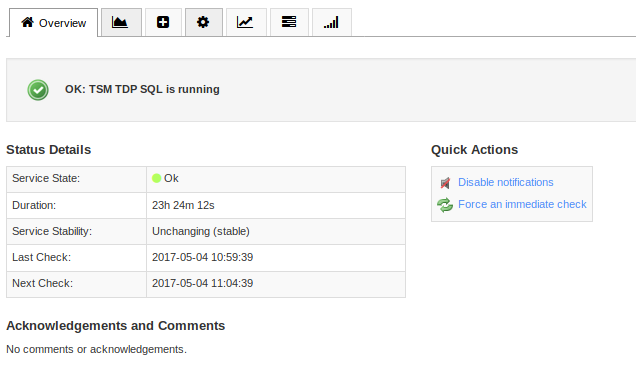
We only see the last result instead of all the result.
Can you help me to fix that please.
Re: NCPA Check see only one result instead of 3.
Posted: Thu May 04, 2017 1:51 pm
by lmiltchev
This is a known issue, which will be fixed in version 1.1.1 of the check_ncpa.py plugin. For more information, see here:
https://github.com/NagiosEnterprises/ncpa/issues/332
Re: NCPA Check see only one result instead of 3.
Posted: Thu May 04, 2017 2:01 pm
by bennyboy
I already use the version 1.1.1
./check_ncpa.py return the right result at the moment on my setup.
Code: Select all
[root@nagiosserver libexec]# ./check_ncpa.py -H ctelqsd366 -t 'our token' -M 'services' -q 'service=SQLSERVERAGENT,service=MSSQLSERVER,service=TSM TDP SQL,status=running'
OK: SQLSERVERAGENT is running, MSSQLSERVER is running, TSM TDP SQL is running
Re: NCPA Check see only one result instead of 3.
Posted: Thu May 04, 2017 2:28 pm
by lmiltchev
Click on the "problem" service under the Service Detail, go to Configure > Re-configure this service, and modify the command to look something like this:
Code: Select all
check_xi_ncpa!-t '<your token>' -P 5693 -M 'services' -q 'service=SQLSERVERAGENT,service=MSSQLSERVER,service=TSM TDP SQL'
You may need to wrap "TSM TDP SQL" in double quotes because of the spaces in the name. I don't have one with spaces to test it, but here's mine:
example01.PNG
If you just ran the wizard, it would add all these services as separate checks, so you will need to configure them manually either in the CCM, or via "Configure > Re-configure..."
Let us know if this helped.
Re: NCPA Check see only one result instead of 3.
Posted: Thu May 04, 2017 2:54 pm
by bennyboy
I try with double quote and it's not working. I also try to use regex match.
I click here
Code: Select all
[nagios@nagios ~]$ /usr/local/nagios/libexec/check_ncpa.py -H IP -t 'ourtoken' -M 'services' -q 'service=MSSQLSERVER,service=SQLSERVERAGENT,service=^TSM\sTDP\sSQL$,match=regex'
OK: MSSQLSERVER is running, SQLSERVERAGENT is running, TSM TDP SQL is running
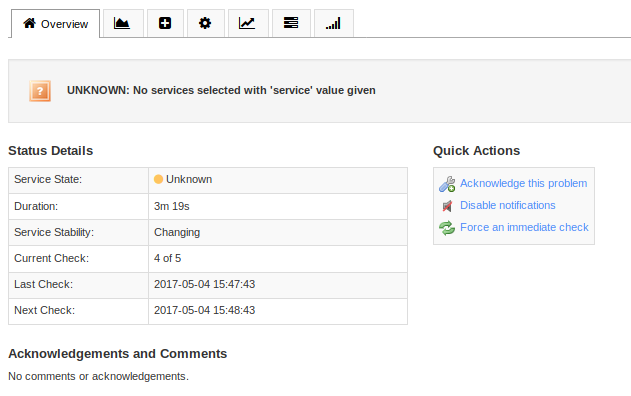
But in Nagios XI I see that.
Re: NCPA Check see only one result instead of 3.
Posted: Thu May 04, 2017 3:09 pm
by lmiltchev
Actually, there was no need to worry about the spaces. Using the command below *should* work fine:
Code: Select all
check_xi_ncpa!-t '<your token>' -P 5693 -M 'services' -q 'service=SQLSERVERAGENT,service=MSSQLSERVER,service=TSM TDP SQL'
I tried a service with space in the name (Pml Driver HPZ12), which works fine with this command:
Code: Select all
check_xi_ncpa!-t 'mytoken' -P 5693 -M 'services' -q 'service=AdobeUpdateService,service=Spooler,service=Pml Driver HPZ12'
example01.PNG
Re: NCPA Check see only one result instead of 3.
Posted: Thu May 04, 2017 3:25 pm
by bennyboy
That my nagios cfg file.
servername.cfg
Code: Select all
define service {
        host_name                       servername
        service_description             Service Status: Planographie SQL Services
        use                             ourtemplace
        check_command                   check_xi_ncpa!-t '<token>' -M 'services' -q 'service=SQLSERVERAGENT,service=MSSQLSERVER,service=TSM TDP SQL'!!!!!!!
        register                        1
        }
ourtemplate config
Code: Select all
define service {
       name                                     ourtemplate
       service_description                      template description
       max_check_attempts                       5
       check_interval                           5
       retry_interval                           1
       check_period                             24x7
       notification_interval                    60
       notification_period                      xi_timeperiod_windows_nonprod
       notification_options                     c,r,
       notifications_enabled                    1
       contacts                                 acontact
       contact_groups                           xi_windows_contact_group
       _opsgenieteams                           Windows
       register                                 0

}
I continue to see that ...
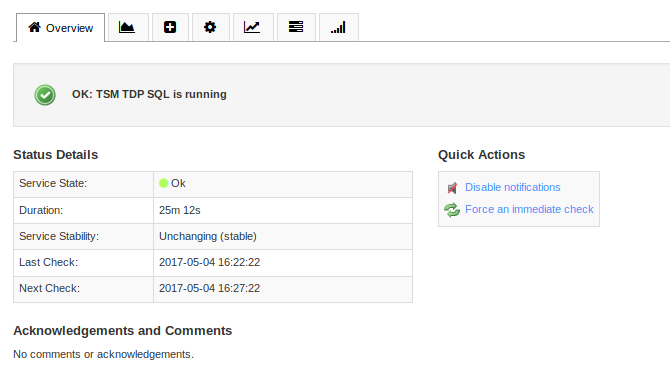
Can you help me to troubleshoot that to find why I only see the last service ...
Thank you!
Re: NCPA Check see only one result instead of 3.
Posted: Thu May 04, 2017 3:36 pm
by dwhitfield
Just as a matter of testing, what happens if you change the command to
check_xi_ncpa!-t '<token>' -M 'services' -q 'service=SQLSERVERAGENT,service=MSSQLSERVER'!!!!!!!
Re: NCPA Check see only one result instead of 3.
Posted: Fri May 05, 2017 7:24 am
by bennyboy
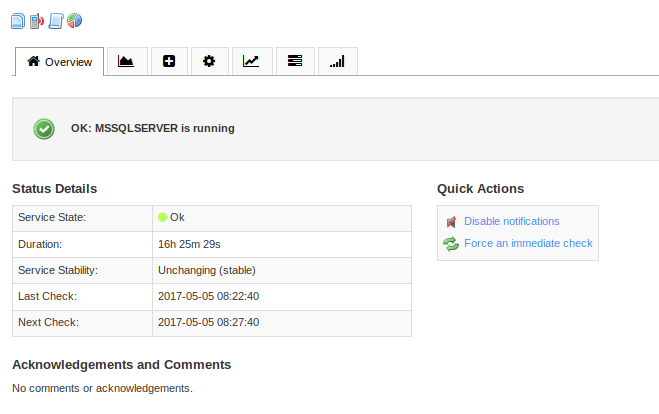
dwhitfield wrote:Just as a matter of testing, what happens if you change the command to
check_xi_ncpa!-t '<token>' -M 'services' -q 'service=SQLSERVERAGENT,service=MSSQLSERVER'!!!!!!!
I see that.
Re: NCPA Check see only one result instead of 3.
Posted: Fri May 05, 2017 9:15 am
by lmiltchev
Are you using modgearman or livestatus?
I am sure you updated your plugin as the output in the CLI that you showed us is correct. Also, your service definition is valid. I would assume that you haven't changed the default command definition for the "check_xi_ncpa" command, have you? Can you show it, along with the output of the command below?
Code: Select all
/usr/local/nagios/libexec/check_ncpa.py -V
If you are using modgearman, it is possible that the job is picked up by the worker, but the NCPA plugin hasn't been updated on the worker machine.
Can you post your nagios.cfg file?
Also, run the following command, and show the output:
Have you tried restarting services?
Code: Select all
service nagios stop
service ndo2db restart
service nagios start