How to use alias from NSClient in Nagios
Posted: Wed Mar 07, 2018 7:41 am
Hi all,
I have Nagios Core 3.5.1 on Ubuntu and monitoring remote Windows 7.
I installed NSClient++ there, the check_nt plugins work. Currently, I started to play with check_nrpe and I would ask for help.
I declared on remote host in the nsclient.ini:
On Nagios, when I write:
I have answer:
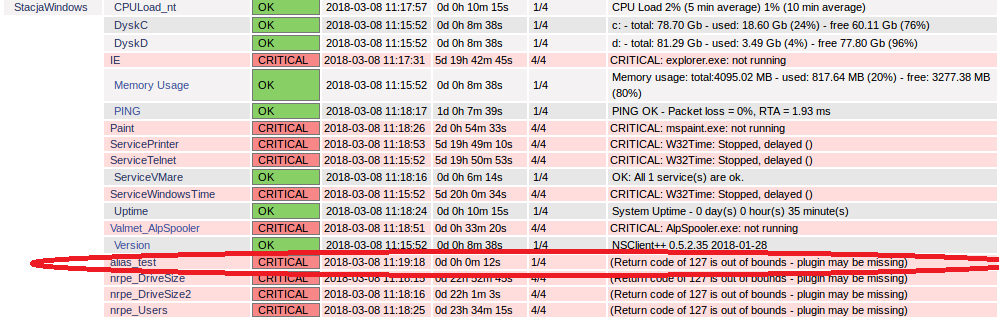
But now I would like to see it on the website.
I've tried various combinations found (changes in commands.cfg, windows.cfg) on the internet, but the effect is that I always have "Status Information: (Return code of 127 is out of bounds - plugin may be missing)"
I will mention that I also have a problem with the plugin check_nrpe. On the example of check_users, where:
In commands.cfg:
In nrpe.cfg on Nagios:
And in windows.cfg:
On website I have answer: "(Return code of 127 is out of bounds - plugin may be missing)".
On command line:
Any ideas? Thanks for any help!
Regards
I have Nagios Core 3.5.1 on Ubuntu and monitoring remote Windows 7.
I installed NSClient++ there, the check_nt plugins work. Currently, I started to play with check_nrpe and I would ask for help.
I declared on remote host in the nsclient.ini:
Code: Select all
[/settings/external scripts/alias]
alias_test = CheckDriveSize FilterType=FIXED matching=.*[CD].* ShowAll=long CheckAll $ARG1$ $ARG2$ $ARG3$ $ARG4$Code: Select all
root@ubuntu:/usr/local/nagios/libexec# ./check_nrpe -H xxx.xxx.xx.xxx -c alias_testCode: Select all
OK C:\: Total: 78.702GB - Used: 18.597GB (24%) - Free: 60.105GB (76%), D:\: Total: 81.295GB - Used: 3.49GB (5%) - Free: 77.804GB (95%)|'C:\ used'=18.59669GB;62.96171;70.83193;0;78.70214 'C:\ used %'=24%;80;90;0;100 'D:\ used'=3.49046GB;65.03593;73.16542;0;81.29491 'D:\ used %'=4%;80;90;0;100I've tried various combinations found (changes in commands.cfg, windows.cfg) on the internet, but the effect is that I always have "Status Information: (Return code of 127 is out of bounds - plugin may be missing)"
I will mention that I also have a problem with the plugin check_nrpe. On the example of check_users, where:
In commands.cfg:
Code: Select all
define command{
 	command_name 	check_nrpe
 	command_line 	$USER1$/check_nrpe -H $HOSTADDRESS$ -c $ARG1$
}Code: Select all
# The following examples use hardcoded command arguments...

command[check_users]=/usr/local/nagios/libexec/check_users -w 5 -c 10Code: Select all
define service{
    use                 generic-service
    host_name           StacjaWindows
    service_description nrpe_Users
    check_command       check_nrpe!check_users
}
On command line:
Code: Select all
root@ubuntu:/usr/local/nagios/libexec# ./check_nrpe -H xxx.xxx.xx.xxx -c check_users
Unknown command(s): check_usersRegards