Page 1 of 1
Collapsing hostgroups
Posted: Mon Aug 13, 2018 4:24 pm
by yomiko
In Nagios Core dashboard, I created a few hostgroups. Each hostgroup has a long list of members.
E.g.
hostgroup_name GroupA
- member 1
...
- member 10
hostgroup_name GroupB
- member 1
...
- member 20
hostgroup_name GroupC
- member 1
...
- member 30
Is there a way to collapse each list so that one will see 1 line per hostgroup. Then, click on it to expand it to the full list?
Re: Collapsing hostgroups
Posted: Mon Aug 13, 2018 4:38 pm
by npolovenko
Hello,
@yomiko. Would you be able to upload a screenshot of the hostgroup page that you're talking about?
Re: Collapsing hostgroups
Posted: Mon Aug 13, 2018 5:39 pm
by yomiko
Sorry, I cannot post the data (since it included internal hostnames).
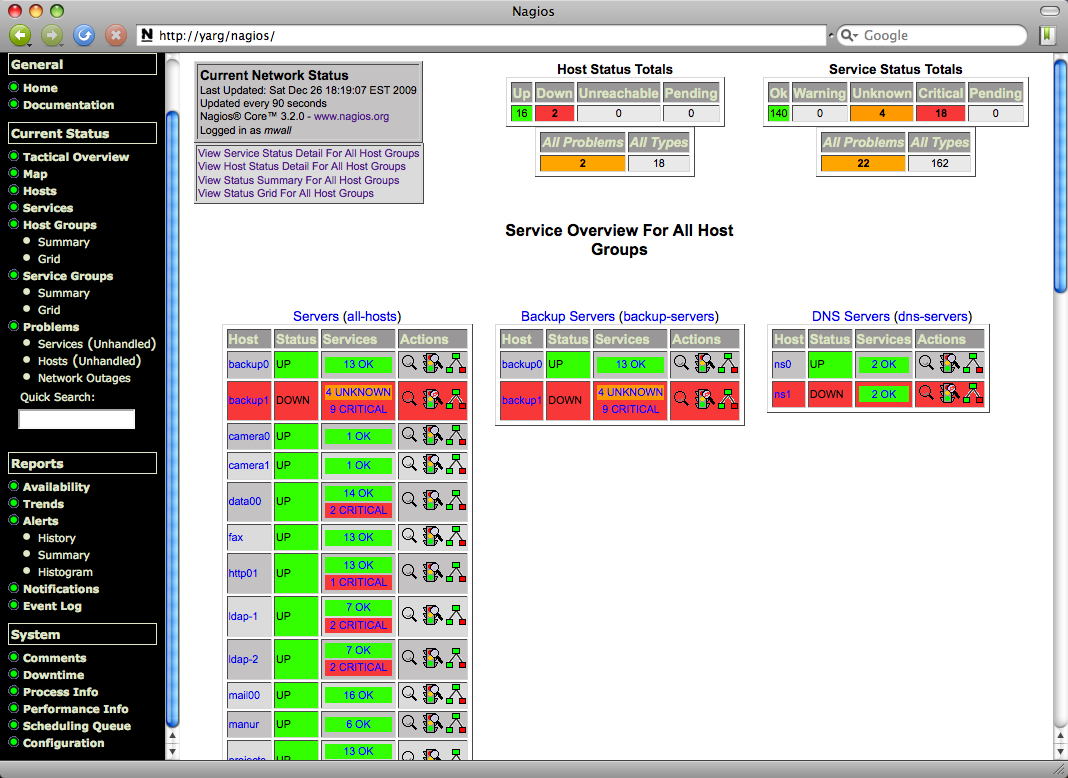
However, I found existing images from the web...
Take this one for example, rather than showing "Servers (all-hosts) with all the hosts under it, I'd like to see just 1 line.
Then, the user could click on it to see the full list of hosts.
http://lancet.mit.edu/mwall/projects/na ... before.png
If it is not possible, I think "Host Groups summary" might be what I need to use:
(Sample image obtained from the web):
https://support.nagios.com/forum/viewto ... f=7&t=3124
Re: Collapsing hostgroups
Posted: Tue Aug 14, 2018 2:27 pm
by lmiltchev
Instead of clicking on the Host Groups link on the left menu, click on the Summary link (under Host Groups). This page will show you the status summary of your hostgroups in a more "condensed" format. Then, you could click on any of the hostgroups to "drill down" and view the hostgroup's members.
Let us know if this helped.