Page 1 of 2
Nagios Core 4.3.4 - Host Appear - Disappear
Posted: Wed Sep 05, 2018 10:12 am
by ogonzales1209
Hi,
I have the following problem, i have 711 host in my nagios core (version 4.3.4) but, some hosts appear and disappaear without action of my part.
result of /usr/local/nagios/bin/nagios -v /usr/local/nagios/etc/nagios.cfg:
Checking objects...
Checked 2749 services.
Checked 711 hosts.
Checked 0 host groups.
Checked 0 service groups.
Checked 13 contacts.
Checked 10 contact groups.
Checked 76 commands.
Checked 5 time periods.
Checked 0 host escalations.
Checked 0 service escalations.
Checking for circular paths...
Checked 711 hosts
Checked 0 service dependencies
Checked 0 host dependencies
Checked 5 timeperiods
OK State:
Host Status Totals
Up Down Unreachable Pending
704 7 0 0
All Problems All Types
7 711
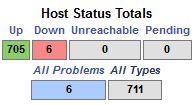
- Ok State
- nagios2.JPG (13.77 KiB) Viewed 3522 times
Fail State
Host Status Totals
Up Down Unreachable Pending
662 4 0 0
All Problems All Types
4 666
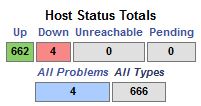
- Fail State
- nagios1.JPG (14.08 KiB) Viewed 3522 times
When i refresh the page the host appear automatically. Please, your support.
Re: Nagios Core 4.3.4 - Host Appear - Disappear
Posted: Wed Sep 05, 2018 3:53 pm
by tgriep
Can you post the nagios.cfg file from the server so we can check the main configuration file settings?
Also, can you post the first 100 lines of the status.dat file?
One thing to check, is the time settings for the Nagios server stable?
If it is drifting, it could cause the issue you are having.
You may also want to upgrade to the latest version of Core on your server.
Re: Nagios Core 4.3.4 - Host Appear - Disappear
Posted: Wed Sep 05, 2018 4:59 pm
by ogonzales1209
Hi tgriep,
Attached as requested
Re: Nagios Core 4.3.4 - Host Appear - Disappear
Posted: Thu Sep 06, 2018 11:36 am
by tgriep
One thing I see is that the Host Freshness option is not enabled on your server.
# This option determines whether or not Nagios will periodically
# check the "freshness" of host results. Enabling this option
# is useful for ensuring passive checks are received in a timely
# manner.
# Values: 1 = enabled freshness checking, 0 = disable freshness checking
Edit the nagios.cfg file and set the option to 1 which will update the Host checks (Active and Passive) in a more timely manner.
Restart nagios and see if that updates the Host Status better.
Re: Nagios Core 4.3.4 - Host Appear - Disappear
Posted: Thu Sep 06, 2018 12:12 pm
by ogonzales1209
thanks for the answer tgriep,
I have noticed that the refreshment is faster, but some host still appear and disappear. as a data I tell you that now I have 725 host and at times I still see only 666, even having increased the total number of hosts (725) always decreases to the same value (666)
Re: Nagios Core 4.3.4 - Host Appear - Disappear
Posted: Thu Sep 06, 2018 12:58 pm
by tgriep
It could be just a browser and the web server timing issue but always going to 666 is weird.
I suggest upgrading to the latest version of Core and you can download that at this link.
https://assets.nagios.com/downloads/nag ... 4.2.tar.gz
Re: Nagios Core 4.3.4 - Host Appear - Disappear
Posted: Fri Sep 07, 2018 9:45 am
by ogonzales1209
Hi,
before making the upgrade, I have another additional verification?
Re: Nagios Core 4.3.4 - Host Appear - Disappear
Posted: Fri Sep 07, 2018 3:12 pm
by tgriep
One more thing to try, edit the /usr/local/nagios/etc/cgi.cfg file and change the following option.
That option changes the refreshing of the other cgi scripts and the data in the GUI. That may work as well.
Remember to restart the Apache and Nagios processes after changing that setting.
Re: Nagios Core 4.3.4 - Host Appear - Disappear
Posted: Mon Sep 10, 2018 9:38 am
by ogonzales1209
Hi,
change the refresh_rate=10 parameter but I still have the same problem, the only option I have is to update?
Re: Nagios Core 4.3.4 - Host Appear - Disappear
Posted: Mon Sep 10, 2018 12:33 pm
by npolovenko
Your issue could be caused by multiple Nagios processes running at the same time. Please run the following commands in order:
service nagios stop
killall -9 nagios
service nagios start
Let me know if this fixes your issue. Also, when did you start noticing this problem? What changes were made to the system prior to that?
