Page 1 of 2

Dell OpenManage Plugin Java not installed

Posted: Fri Oct 01, 2021 2:31 am
by Manuel
Hello,

since a few day I am trying to get the Dell OpenManage Plugin 3.1 to work but not having success.
I also tried openjdk 1.11 with the same results

Code: Select all

root@lx-nagios-xi-01:/usr/local/nagiosxi/html/includes/configwizards/Dell_EMC_OM_NagiosXI_monitoring_wizard/plugins# ./prerequisitecheck.sh
SNMPTT is installed.<br>JAVA is not installed in "" path.<br>Python version (2.7.5 / 3.6.3) or above is installed.<br>Python argparse module is installed.<br>Python netaddr module is installed.<br>   OpenManage Python Software Development Kit (OMSDK) module is installed.

Code: Select all

root@lx-nagios-xi-01:/# java -version
openjdk version "1.8.0_292"
OpenJDK Runtime Environment (build 1.8.0_292-8u292-b10-0ubuntu1~20.04-b10)
OpenJDK 64-Bit Server VM (build 25.292-b10, mixed mode)

Code: Select all

root@lx-nagios-xi-01:/# whereis java
java: /usr/bin/java /usr/share/man/man1/java.1.gz
The permissions are set like this:

Code: Select all

root@lx-nagios-xi-01:/usr/bin# ll java
lrwxrwxrwx 1 root root 22 Oct  1 06:51 java -> /etc/alternatives/java*

Code: Select all

root@lx-nagios-xi-01:/etc/alternatives# ll java
lrwxrwxrwx 1 root root 46 Oct  1 09:07 java -> /usr/lib/jvm/java-8-openjdk-amd64/jre/bin/java*

Code: Select all

nagios@lx-nagios-xi-01:/usr/lib/jvm/java-8-openjdk-amd64/jre/bin$ ls -la
total 280
drwxr-xr-x 2 root root   4096 Oct  1 09:07 .
drwxr-xr-x 5 root root   4096 Oct  1 09:07 ..
-rwxr-xr-x 1 root root  14632 Apr 21 13:46 java
-rwxr-xr-x 1 root root  14664 Apr 21 13:46 jjs
-rwxr-xr-x 1 root root  14664 Apr 21 13:46 keytool
-rwxr-xr-x 1 root root  14720 Apr 21 13:46 orbd
-rwxr-xr-x 1 root root  14664 Apr 21 13:46 pack200
-rwxr-xr-x 1 root root  14664 Apr 21 13:46 policytool
-rwxr-xr-x 1 root root  14664 Apr 21 13:46 rmid
-rwxr-xr-x 1 root root  14664 Apr 21 13:46 rmiregistry
-rwxr-xr-x 1 root root  14664 Apr 21 13:46 servertool
-rwxr-xr-x 1 root root  14720 Apr 21 13:46 tnameserv
-rwxr-xr-x 1 root root 111736 Apr 21 13:46 unpack200
I hope you have an idea.

Kind regards
Manuel

Re: Dell OpenManage Plugin Java not installed

Posted: Fri Oct 01, 2021 3:52 pm
by kfanselow
Hi Manuel,

It looks like you have java installed correctly and for some reason prerequisitecheck.sh is not recognizing the link in your path. Looking at the script it appears that the path isn't being defined. Try setting the JAVAINSTALLPATH in your shell (bourne or bash) prior to running the script:

JAVAINSTALLPATH=/usr/bin/java
export JAVAINSTALLPATH
echo $JAVAINSTALLPATH

If that fails please send me a "System Profile" and tarball of your plugins directory via a Private Message and we'll see what we can find.

####### Generating a System Profile
To send us your system profile:
Login to the Nagios XI GUI using a web browser.
Click the "Admin" (top right)
Click on "System Profile" ( left side )
Click the "Download Profile" button.

Re: Dell OpenManage Plugin Java not installed

Posted: Mon Oct 11, 2021 4:17 pm
by kfanselow
Hi Manuel,

Thank you for sending your system profile. When you look at the plugin via Admin(top) > System Extensions (left) > Manage Config Wizards (left) what version is it showing and does the "Download Archive button" let you download the zip file ?

Thanks in advance

Re: Dell OpenManage Plugin Java not installed

Posted: Wed Oct 13, 2021 1:17 am
by Manuel
Hi,

the "Download Archived" button at the Dell EMC Plugin is working fine.
It shows version 3.1.

Kind regards
Manuel

Re: Dell OpenManage Plugin Java not installed

Posted: Wed Oct 13, 2021 3:50 pm
by kfanselow
Hi Manuel,

So were both have the same version installed and very similar java configurations. When I run the shell script on the command line as the user nagios I get the same error message you are seeing but I am not seeing that message in the "Prerequisite Checks" output when I run the wizard through the interface. When you run the plugin through the Configuration Wizards page are you seeing the 'JAVA is not installed in "" path.' message ? Is it populating the Java install path in the "Configuration Parameters" section at the bottom ?

Thanks and Best Regards,
Keith

Re: Dell OpenManage Plugin Java not installed

Posted: Thu Oct 14, 2021 12:59 am
by Manuel
Hi Keith,

I timed out while writing a long details post. So now the summary.
I get the same results you are getting, so the plugin is working but...
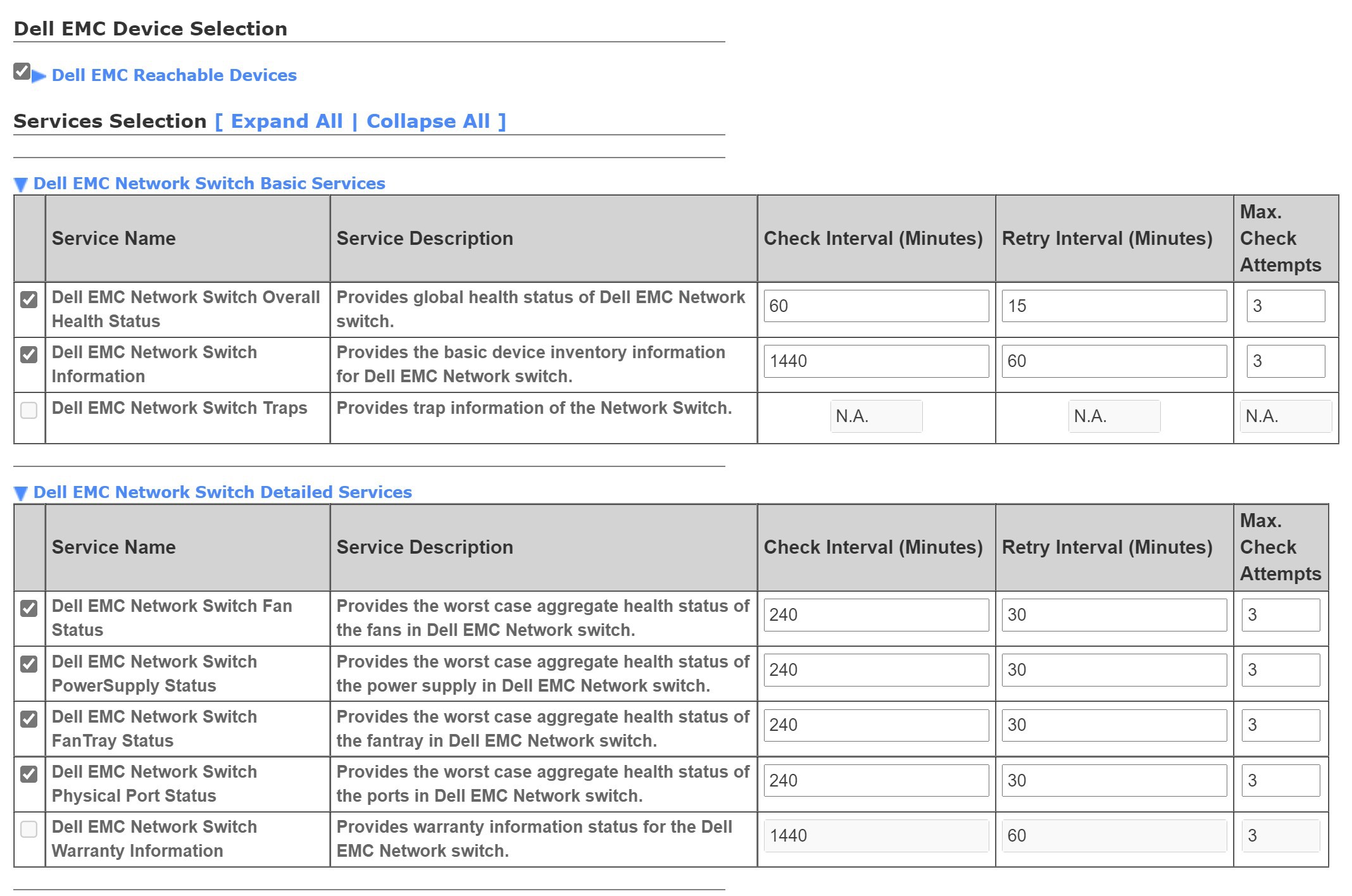
when using the plugin I get the follwing:
https://abload.de/img/nagiosxiemcwhjou.jpg

The two grey fields are with all possible devices (Switches, iDrac, ...).
During research I found out that this is related to missing java and snmptt.
As snmptt configuration works through the trap interface, it is not great but I works so no problem there.

At page 16 you will find the reason "missing java" for the warranty part and "missing snmptt" for traps:
https://dl.dell.com/topicspdf/openmanag ... _en-us.pdf

Kind regards
Manuel

Re: Dell OpenManage Plugin Java not installed

Posted: Thu Oct 14, 2021 3:27 pm
by kfanselow
Hi Manuel,

Have you tried setting the JAVA install path to the actual path to the binary ( bypassing the links ) ? Also have you tried changing the path to a bad value to see if there is a change in behavior ?

Thanks and Best Regards,
Keith

Re: Dell OpenManage Plugin Java not installed

Posted: Thu Oct 14, 2021 11:46 pm
by Manuel
Hi Keith,

bypassing the links, I just tested, but got the same result. The bad value for the path also doesn't change anything

Kind regards
Manuel

Re: Dell OpenManage Plugin Java not installed

Posted: Fri Oct 15, 2021 4:04 pm
by ssax
Did you try restart apache after installing java/snmptt?

Code: Select all

systemctl restart apache
What is the output of this command from an SSH session to the XI server?

Code: Select all

su -s /bin/bash -c '/usr/local/nagiosxi/html/includes/configwizards/Dell_EMC_OM_NagiosXI_monitoring_wizard/plugins/prerequisitecheck.sh config /usr/local/nagiosxi/tmp/dellemc//log snmptt /usr/bin/java /usr/local/nagios/libexec' www-data
When you're on that page of the 2nd page of the wizard where it lists the services (please run it again), please grab the files from /usr/local/nagiosxi/tmp/dellemc/host/ for it and PM them to me so I can see what they contain.

EDIT: Please check the box for SNMP Traps/Warranty, set some values, and click next to see what it shows.

EDIT 2: The SNMP Trap functionality literally just adds a passive service definition with the name Dell EMC Network Switch Traps so it will always say N.A. for the thresholds because passives don't use those settings

Re: Dell OpenManage Plugin Java not installed

Posted: Mon Oct 18, 2021 12:03 am
by Manuel
Hi,

the output:

Code: Select all

SNMPTT is installed.<br>JAVA is installed in "/usr/bin/java" path.
./prerequisitecheck.sh in the plugin folder still shows that java is not installed.

I can't select Dell EMC Network Switch Traps or DELL EMC Network Switch Warranty Information. The select box is greyed out.
https://abload.de/img/nagiosxiemcwhjou.jpg

Kind regards
Manuel