Page 1 of 1
So many process Nagios running after upgrade to 3.4.1
Posted: Tue Oct 30, 2012 3:08 am
by schukido
Dear all,
I just upgraded my Nagios from 3.2.0 to 3.4.1 but have an issue. After times, a main process of nagios ( /usr/local/nagios/bin/nagios -d /usr/local/nagios/etc/nagios.cfg) fork to many child process. It is normal if they will disappear. But they still remain and the number of child process is rising.
Can anyone help me to fix that problems?
Thank you so much.
Re: So many process Nagios running after upgrade to 3.4.1
Posted: Tue Oct 30, 2012 9:45 am
by mguthrie
Nagios forks itself to execute checks, so as long as you're only seeing child processes, it shouldn't be a concern. However, if you have multiple parent Nagios processes running that can cause a variety of problems.
Re: So many process Nagios running after upgrade to 3.4.1
Posted: Tue Oct 30, 2012 9:10 pm
by schukido
@
mguthrie wrote:Nagios forks itself to execute checks, so as long as you're only seeing child processes, it shouldn't be a concern. However, if you have multiple parent Nagios processes running that can cause a variety of problems.
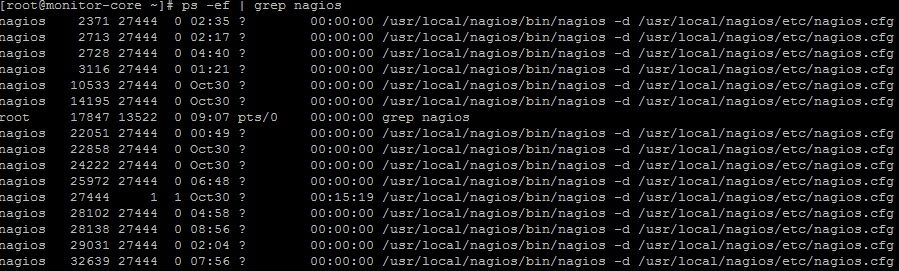
Thank you for your reply. I only have one parent Nagios processes running but after several days it can be forks itself over twenty dead child processes. I have another Nagios system but it doesn't behave like this, only one parent process running. Does anyone can help me fix it? Thank you so much.
There is an example:
Re: So many process Nagios running after upgrade to 3.4.1
Posted: Wed Oct 31, 2012 9:32 am
by mguthrie
On the performance info page, what's your average for "Check Execution time" for both hosts and services. It's possible you've got some bum checks on that machine that take the full 60 seconds to time out before Nagios kills them off.
Re: So many process Nagios running after upgrade to 3.4.1
Posted: Sun Nov 04, 2012 6:09 am
by schukido
mguthrie wrote:On the performance info page, what's your average for "Check Execution time" for both hosts and services. It's possible you've got some bum checks on that machine that take the full 60 seconds to time out before Nagios kills them off.
On the performance info page, my average for " Check Execution time" for service is
Metric Min. Max. Average
Check Execution Time: 0.00 sec 15.03 sec 0.807 sec
And for host is:
Metric Min. Max. Average
Check Execution Time: 3.07 sec 6.37 sec 4.080 sec.
Any ideas?
Re: So many process Nagios running after upgrade to 3.4.1
Posted: Thu Nov 08, 2012 9:31 pm
by schukido
I'm still have a problem, can't not resolve. Any helps

Re: So many process Nagios running after upgrade to 3.4.1
Posted: Fri Nov 09, 2012 11:28 am
by agriffin
What does your load avg look like? I'm not convinced there's actually a problem unless the system load is also steadily rising.
Re: So many process Nagios running after upgrade to 3.4.1
Posted: Sun Nov 11, 2012 1:25 am
by schukido
I use "top" to show load average: 3.50, 3.47, 3.84
My server has: 8 core CPU ( 2x quad core , no HT) with 16GB RAM. CentOS 5.8 with yum up-to-date. But it seems to be my server overload because I run perl script very low. I monitored about 2k5 service ( about 800 perl script) and 400 hosts. When I start Nagios , i see many thread with <nagios> defunct and it makes child process cannot be killed.
ps -ef | grep nagios
[root@monitor-core ~]# ps -ef | grep nagios | more
nagios 394 28747 0 09:52 ? 00:00:00 /usr/local/nagios/bin/nagios -d
/usr/local/nagios/etc/nagios.cfg
nagios 400 28747 0 10:19 ? 00:00:00 /usr/local/nagios/bin/nagios -d
/usr/local/nagios/etc/nagios.cfg
nagios 405 28747 0 10:19 ? 00:00:00 /usr/local/nagios/bin/nagios -d
/usr/local/nagios/etc/nagios.cfg
nagios 414 28747 0 10:19 ? 00:00:00 /usr/local/nagios/bin/nagios -d
/usr/local/nagios/etc/nagios.cfg
nagios 779 28747 0 10:19 ? 00:00:00 /usr/local/nagios/bin/nagios -d
/usr/local/nagios/etc/nagios.cfg
nagios 796 28747 0 10:19 ? 00:00:00 /usr/local/nagios/bin/nagios -d
/usr/local/nagios/etc/nagios.cfg
nagios 1051 28747 0 12:40 ? 00:00:00 /usr/local/nagios/bin/nagios -d
/usr/local/nagios/etc/nagios.cfg
nagios 1083 28747 0 11:35 ? 00:00:00 /usr/local/nagios/bin/nagios -d
/usr/local/nagios/etc/nagios.cfg
nagios 1470 28747 0 11:23 ? 00:00:00 /usr/local/nagios/bin/nagios -d
/usr/local/nagios/etc/nagios.cfg
nagios 1865 28747 0 13:13 ? 00:00:00 /usr/local/nagios/bin/nagios -d
/usr/local/nagios/etc/nagios.cfg
nagios 1866 28747 0 13:13 ? 00:00:00 /usr/local/nagios/bin/nagios -d
/usr/local/nagios/etc/nagios.cfg
nagios 2042 28747 0 11:36 ? 00:00:00 /usr/local/nagios/bin/nagios -d
... and so on.
I try to use large_installation_tweak and tuning some options but it isn't better. Please help me fix it ASAP, now my server have so many services with old last check because process can not be killed automatic.
Thank you
Re: So many process Nagios running after upgrade to 3.4.1
Posted: Tue Nov 13, 2012 2:26 pm
by agriffin
Those processes are called
zombie processes, and are created in normal operation when Nagios runs checks. They have already finished executing and have freed up any resources they were using (so they are not slowing down your system), and will disappear when Nagios gets around to checking their exit statuses. If they start to accumulate over time so that there are more zombie processes today than there were yesterday, it's probably because something else is slowing the system down. They are a
symptom of a slow system, not the cause.
In this case, a system load between 3 and 4 on an 8 core system doesn't seem that bad to me. If you want your system to be snappier I would recommend a hardware upgrade (probably starting with faster storage).