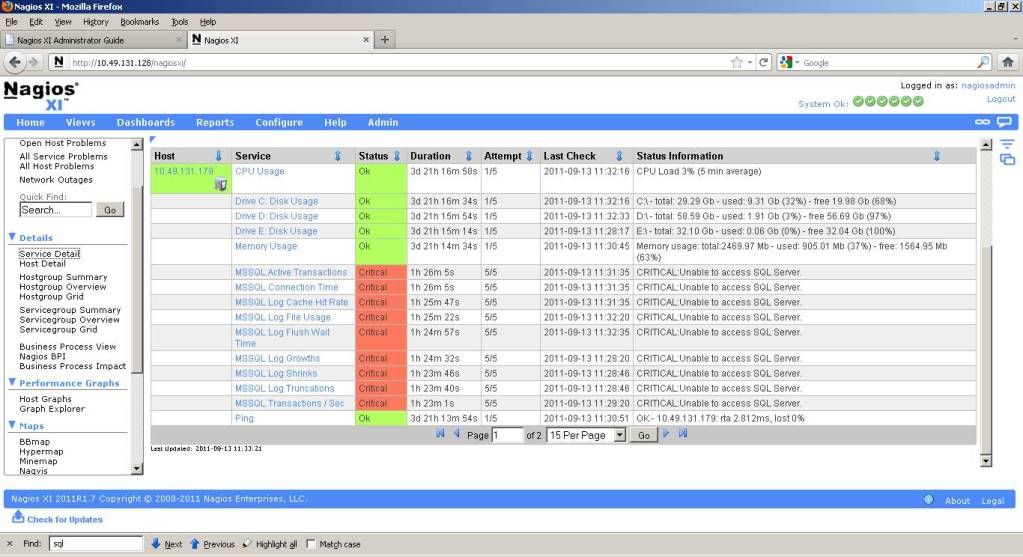
Does anyone here encountered the same problem.
Please see below.
Can anyone help me how to solve this problem? Why it goes critical. I have already installed the agent for Windows, where my MS SQL is running.
What other things should I do, to successfully monitor my MS SQL.
Thank you,
John Benedict Z. Maliwat
Junior Technical Support Engineer
Manila, Philippines
If thats not fixing it, I would Google for 'MSSQL <your version of MSSQL> IP' to find more articles as it varies a little bit for each different version.
Then you'll also need to enable SQL authentication, again, here is a good reference for that:
It can vary pretty significantly from MSSQL server to MSSQL server, so I"d recommed dropping down to the command line and going to /usr/local/nagios/libexec and running the plugin manually til you find the correct login credentials:
./check_mssql_server -H <IP of MSSQL> -U <user with SELECT access on master and temp> -P <password for said user> -p <port open on MSSQL server>
This is the quickest way to diagnose connectivity issues with the MSSQL database.