Hi everyone, i got another problem in the incredible world of Nagios XI.
I got a passive checks in a windows 7 and i need to ping a device connected to my computer (host w7) and report if the ping is successful "OK" if not "Critical".
Pls tell me what plugin i have to use and the command line.
Thx a lot!!!
Ping + NRDS

Re: Ping + NRDS
To add the command, you would use the NRDS Config Manager in the XI GUI. Go to the Admin > NRDS Config Manager menu
Fin the config you are using and edit it.
Add this line to the bottom of the commands field replacing xxx.xxx.xxx.xxx with the IP address
Save the file out and the next time NRDS is run on the Windows system, it should download the changes and run it.
Then on the XI server, go to the Admin > Unconfigured Objects menu, the first time a passive check is run, it needs to be configured so that is where you will find it to finalize it's configuration.
Fin the config you are using and edit it.
Add this line to the bottom of the commands field replacing xxx.xxx.xxx.xxx with the IP address
Code: Select all
command[Ping] = $PLUGIN_DIR$\check_winping.exe -H xxx.xxx.xxx.xxx --warning 200,40% --critical 400,80%Then on the XI server, go to the Admin > Unconfigured Objects menu, the first time a passive check is run, it needs to be configured so that is where you will find it to finalize it's configuration.
Be sure to check out our Knowledgebase for helpful articles and solutions!
Re: Ping + NRDS
i already add ittgriep wrote:To add the command, you would use the NRDS Config Manager in the XI GUI. Go to the Admin > NRDS Config Manager menu
Fin the config you are using and edit it.
Add this line to the bottom of the commands field replacing xxx.xxx.xxx.xxx with the IP addressCode: Select all
command[Ping] = $PLUGIN_DIR$\check_winping.exe -H xxx.xxx.xxx.xxx --warning 200,40% --critical 400,80%
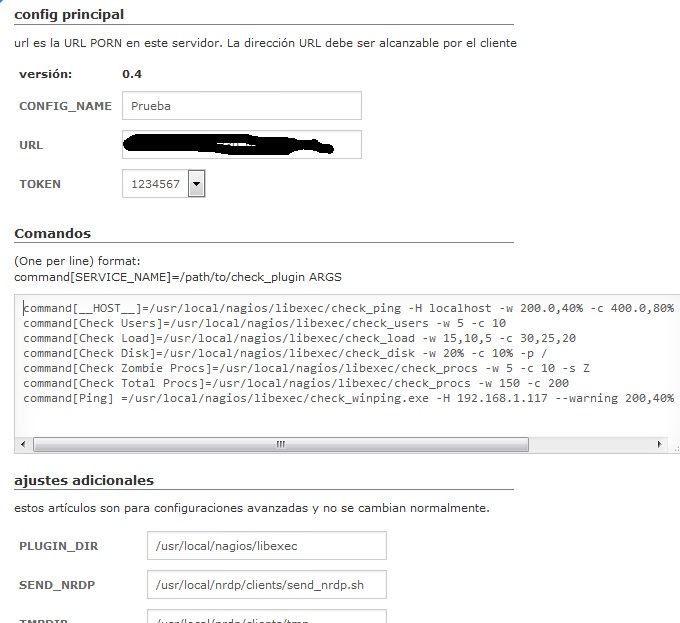
This is what happen when i configured the host.tgriep wrote:Save the file out and the next time NRDS is run on the Windows system, it should download the changes and run it.
Then on the XI server, go to the Admin > Unconfigured Objects menu, the first time a passive check is run, it needs to be configured so that is where you will find it to finalize it's configuration.
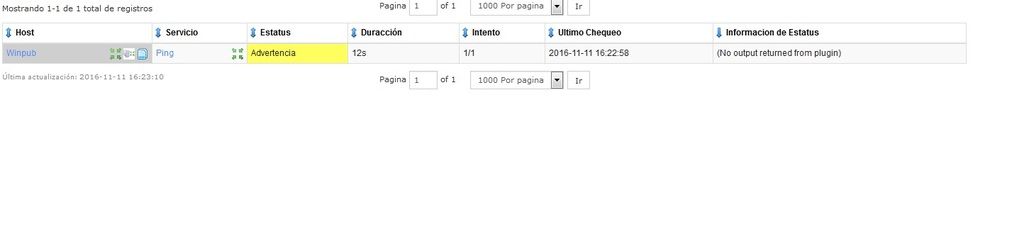
Any idea?
ty
Re: Ping + NRDS
It looks like you edited a NRDS config for a linux system and not a configuration windows system.
Is the remote system that NRDS is running on a windows system or a linux system?
Is the remote system that NRDS is running on a windows system or a linux system?
Be sure to check out our Knowledgebase for helpful articles and solutions!
Re: Ping + NRDS
Windows 7.
This is what i type in the Config.ini
#<check_name> = <path location\file name> <check arguments>
command[Ping] = .\plugins\check_winping.exe -H 192.168.1.117 --warning 200,40% --critical 400,80%
This is what i type in the Config.ini
#<check_name> = <path location\file name> <check arguments>
command[Ping] = .\plugins\check_winping.exe -H 192.168.1.117 --warning 200,40% --critical 400,80%
Re: Ping + NRDS
Edit the config.ini file and change this line from
And see if that works.
If not, please post your full config.ini file.
Code: Select all
command[Ping] = .\plugins\check_winping.exe -H 192.168.1.117 --warning 200,40% --critical 400,80%
to
Code: Select all
command[Ping] = $PLUGIN_DIR$\check_winping.exe -H 192.168.1.117 --warning 200,40% --critical 400,80%If not, please post your full config.ini file.
Be sure to check out our Knowledgebase for helpful articles and solutions!
Re: Ping + NRDS
I tryied and it dosent work.
This is my Config.ini
[settings]
CONFIG_VERSION=0
CONFIG_NAME=
URL="MYIP"
TOKEN=1234567
PLUGIN_DIR=C:\Program Files\Nagios\NRDS_Win\plugins
UPDATE_CONFIG=1
UPDATE_PLUGINS=1
LOG_FILE=C:\Program Files\Nagios\NRDS_Win\logs\NRDS_debug.log
[services]
#<check_name> = <path location\file name> <check arguments>
Time = .\plugins\check_windows_time.bat 192.168.230.69 180 300
#<check_name> = <path location\file name> <check arguments>
LOG = .\plugins\check_log3.exe -s NUL -l "C:\ISALtda\PTPOS\terminal.properties" -p "usa_controladora=[Ss]i" --negate -c 1
#<check_name> = <path location\file name> <check arguments>
command[process_Paint]= .\plugins\check_winprocess.exe --filter "imagename eq mspaint.exe" --compare le --critical 0
#<check_name> = <path location\file name> <check arguments>
command[Ping] = $PLUGIN_DIR$\check_winping.exe -H 192.168.1.117 --warning 200,40% --critical 400,80%
[extensions]
vbs = cscript //nologo $CHECK_COMMAND$
ps1 = powershell -ExecutionPolicy Bypass -File $CHECK_COMMAND$
This is my Config.ini
[settings]
CONFIG_VERSION=0
CONFIG_NAME=
URL="MYIP"
TOKEN=1234567
PLUGIN_DIR=C:\Program Files\Nagios\NRDS_Win\plugins
UPDATE_CONFIG=1
UPDATE_PLUGINS=1
LOG_FILE=C:\Program Files\Nagios\NRDS_Win\logs\NRDS_debug.log
[services]
#<check_name> = <path location\file name> <check arguments>
Time = .\plugins\check_windows_time.bat 192.168.230.69 180 300
#<check_name> = <path location\file name> <check arguments>
LOG = .\plugins\check_log3.exe -s NUL -l "C:\ISALtda\PTPOS\terminal.properties" -p "usa_controladora=[Ss]i" --negate -c 1
#<check_name> = <path location\file name> <check arguments>
command[process_Paint]= .\plugins\check_winprocess.exe --filter "imagename eq mspaint.exe" --compare le --critical 0
#<check_name> = <path location\file name> <check arguments>
command[Ping] = $PLUGIN_DIR$\check_winping.exe -H 192.168.1.117 --warning 200,40% --critical 400,80%
[extensions]
vbs = cscript //nologo $CHECK_COMMAND$
ps1 = powershell -ExecutionPolicy Bypass -File $CHECK_COMMAND$
Re: Ping + NRDS
Is the check_winping.exe file in the C:\Program Files\Nagios\NRDS_Win\plugins folder?
Be sure to check out our Knowledgebase for helpful articles and solutions!
Re: Ping + NRDS
well, i make a .bat that successful check.
thx for the answer.
@echo off
ping -n 1 "HERE PUT THE IP / HOST" -w 20000 >NUL
IF ERRORLEVEL 1 GOTO err
IF ERRORLEVEL 0 GOTO ok
GOTO unknown
:err
echo CRITICAL: Ping check failed
exit /B 2
:unknown
echo UNKNOWN: Something went wrong
exit /B 3
:ok
echo OK: Ping succeded
exit /B 0
thx for the answer.
@echo off
ping -n 1 "HERE PUT THE IP / HOST" -w 20000 >NUL
IF ERRORLEVEL 1 GOTO err
IF ERRORLEVEL 0 GOTO ok
GOTO unknown
:err
echo CRITICAL: Ping check failed
exit /B 2
:unknown
echo UNKNOWN: Something went wrong
exit /B 3
:ok
echo OK: Ping succeded
exit /B 0