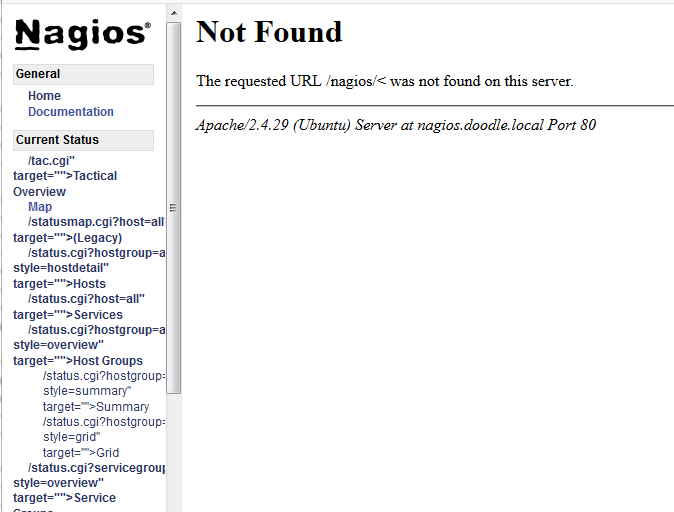
"URL /nagios/< was not found" after Ubuntu 18.04.01 upgrade

Support forum for Nagios Core, Nagios Plugins, NCPA, NRPE, NSCA, NDOUtils and more. Engage with the community of users including those using the open source solutions.
stewlg
Posts: 15
Joined: Fri Nov 14, 2014 11:03 am

"URL /nagios/< was not found" after Ubuntu 18.04.01 upgrade

Post by stewlg »

Upgrading to Ubuntu 18.04.1 broke my Nagios installation.

Image

Fair warning, this is a venerable installation, running back 5+ years at least, so there may be some odd leftovers of prior versions or setups, although I've done my best to clean them up.

I've done some investigation after reading similar posts, but have come to the end of things to try.

My Apache nagios.conf:

Code: Select all

# SAMPLE CONFIG SNIPPETS FOR APACHE WEB SERVER
#
# This file contains examples of entries that need
# to be incorporated into your Apache web server
# configuration file.  Customize the paths, etc. as
# needed to fit your system.

#<VirtualHost *:80>
#ServerName nagios.doodle.local
#ServerAlias nagios
#ServerAdmin [email protected]
#DocumentRoot /usr/local/nagios/share

ScriptAlias /nagios/cgi-bin "/usr/local/nagios/sbin"
ScriptAlias /cgi-bin "/usr/local/nagios/sbin"
Alias /nagios  "/usr/local/nagios/share"

<Directory "/usr/local/nagios/sbin">
#  SSLRequireSSL
   Options ExecCGI
   AllowOverride None
   <IfVersion >= 2.3>
      <RequireAll>
         Require all granted
#        Require host 127.0.0.1

         AuthName "Nagios Access"
         AuthType Basic
         AuthUserFile /usr/local/nagios/etc/htpasswd.users
         Require valid-user
      </RequireAll>
   </IfVersion>
   <IfVersion < 2.3>
      Order allow,deny
      Allow from all
#     Order deny,allow
#     Deny from all
#     Allow from 127.0.0.1

      AuthName "Nagios Access"
      AuthType Basic
      AuthUserFile /usr/local/nagios/etc/htpasswd.users
      Require valid-user
   </IfVersion>
</Directory>


<Directory "/usr/local/nagios/share">
#  SSLRequireSSL
   Options None
   AllowOverride None
   <IfVersion >= 2.3>
      <RequireAll>
         Require all granted
#        Require host 127.0.0.1

         AuthName "Nagios Access"
         AuthType Basic
         AuthUserFile /usr/local/nagios/etc/htpasswd.users
         Require valid-user
      </RequireAll>
   </IfVersion>
   <IfVersion < 2.3>
      Order allow,deny
      Allow from all
#     Order deny,allow
#     Deny from all
#     Allow from 127.0.0.1

      AuthName "Nagios Access"
      AuthType Basic
      AuthUserFile /usr/local/nagios/etc/htpasswd.users
      Require valid-user
   </IfVersion>
</Directory>


#</VirtualHost>
apache2 error log (seems clean to me)

Code: Select all

[Sun Oct 21 21:37:11.445137 2018] [so:warn] [pid 4420] AH01574: module dav_module is already loaded, skipping
[Sun Oct 21 21:37:11.451992 2018] [mpm_prefork:notice] [pid 4421] AH00163: Apache/2.4.29 (Ubuntu) SVN/1.9.7 configured -- resuming normal operations
[Sun Oct 21 21:37:11.452026 2018] [core:notice] [pid 4421] AH00094: Command line: '/usr/sbin/apache2'
[Sun Oct 21 21:40:18.576733 2018] [mpm_prefork:notice] [pid 4421] AH00169: caught SIGTERM, shutting down
[Sun Oct 21 21:43:40.349109 2018] [so:warn] [pid 2314] AH01574: module dav_module is already loaded, skipping
[Sun Oct 21 21:43:40.364410 2018] [mpm_prefork:notice] [pid 2617] AH00163: Apache/2.4.29 (Ubuntu) SVN/1.9.7 configured -- resuming normal operations
[Sun Oct 21 21:43:40.364456 2018] [core:notice] [pid 2617] AH00094: Command line: '/usr/sbin/apache2'
The nagios service starts and stops, but hammers me with errors I can't suppress so I have manually stopped the service for the moment.

Suggestions appreciated.
scottwilkerson
DevOps Engineer
Posts: 19396
Joined: Tue Nov 15, 2011 3:11 pm
Location: Nagios Enterprises
Contact:

Re: "URL /nagios/< was not found" after Ubuntu 18.04.01 upgr

Post by scottwilkerson »

Is php installed on this server?

For nagios 5 php is required

Code: Select all

apt-get install php
Former Nagios employee
Creator:
Human Design Website
Get Your Human Design Chart
stewlg
Posts: 15
Joined: Fri Nov 14, 2014 11:03 am

Re: "URL /nagios/< was not found" after Ubuntu 18.04.01 upgr

Post by stewlg »

Yes, PHP is already installed:

Code: Select all

root@griffin:~# apt-get install php
Reading package lists... Done
Building dependency tree       
Reading state information... Done
php is already the newest version (1:7.2+60ubuntu1).
0 upgraded, 0 newly installed, 0 to remove and 3 not upgraded.
root@griffin:~# 
scottwilkerson
DevOps Engineer
Posts: 19396
Joined: Tue Nov 15, 2011 3:11 pm
Location: Nagios Enterprises
Contact:

Re: "URL /nagios/< was not found" after Ubuntu 18.04.01 upgr

Post by scottwilkerson »

You may also be missing the apache php module

Code: Select all

sudo apt install libapache2-mod-php
then restart apache

Code: Select all

sudo systemctl restart apache2
Former Nagios employee
Creator:
Human Design Website
Get Your Human Design Chart
stewlg
Posts: 15
Joined: Fri Nov 14, 2014 11:03 am

Re: "URL /nagios/< was not found" after Ubuntu 18.04.01 upgr

Post by stewlg »

libapache2-mod-php appears to already be installed:

Code: Select all

root@griffin:~# apt install libapache2-mod-php
Reading package lists... Done
Building dependency tree       
Reading state information... Done
libapache2-mod-php is already the newest version (1:7.2+60ubuntu1).
0 upgraded, 0 newly installed, 0 to remove and 3 not upgraded.
root@griffin:~# 
Thank you for taking the time to walk through this with me.
scottwilkerson
DevOps Engineer
Posts: 19396
Joined: Tue Nov 15, 2011 3:11 pm
Location: Nagios Enterprises
Contact:

Re: "URL /nagios/< was not found" after Ubuntu 18.04.01 upgr

Post by scottwilkerson »

Even though these seem to be installed somehow it appears you do not have php active for apache2, lets run the following

Code: Select all

echo '<?php phpinfo( ); ?>' > /usr/local/nagios/share/info.php
then try to go to the following address in your browser

Code: Select all

http://YOUR_HOST/nagios/info.php
do you get anything displayed?

also, can you post the output of the following command

Code: Select all

ls -l /etc/apache2/mods-enabled/php*
apache2ctl -M
Former Nagios employee
Creator:
Human Design Website
Get Your Human Design Chart
stewlg
Posts: 15
Joined: Fri Nov 14, 2014 11:03 am

Re: "URL /nagios/< was not found" after Ubuntu 18.04.01 upgr

Post by stewlg »

scottwilkerson wrote:Even though these seem to be installed somehow it appears you do not have php active for apache2, lets run the following

Code: Select all

echo '<?php phpinfo( ); ?>' > /usr/local/nagios/share/info.php
then try to go to the following address in your browser

Code: Select all

http://YOUR_HOST/nagios/info.php
do you get anything displayed?
No, nothing is displayed. Blank screen.
scottwilkerson wrote: also, can you post the output of the following command

Code: Select all

ls -l /etc/apache2/mods-enabled/php*
apache2ctl -M
Sure thing:

Code: Select all

root@griffin:~# ls -l /etc/apache2/mods-enabled/php*
ls: cannot access '/etc/apache2/mods-enabled/php*': No such file or directory

Code: Select all

[Fri Nov 02 23:03:56.726550 2018] [so:warn] [pid 6892] AH01574: module dav_module is already loaded, skipping
Loaded Modules:
 core_module (static)
 so_module (static)
 watchdog_module (static)
 http_module (static)
 log_config_module (static)
 logio_module (static)
 version_module (static)
 unixd_module (static)
 access_compat_module (shared)
 alias_module (shared)
 auth_basic_module (shared)
 authn_core_module (shared)
 authn_file_module (shared)
 authz_core_module (shared)
 authz_groupfile_module (shared)
 authz_host_module (shared)
 dav_module (shared)
 dav_svn_module (shared)
 authz_svn_module (shared)
 authz_user_module (shared)
 autoindex_module (shared)
 cgi_module (shared)
 deflate_module (shared)
 dir_module (shared)
 env_module (shared)
 filter_module (shared)
 mime_module (shared)
 mpm_prefork_module (shared)
 negotiation_module (shared)
 reqtimeout_module (shared)
 rewrite_module (shared)
 setenvif_module (shared)
 status_module (shared)
root@griffin:/etc/apache2/mods-enabled# 
stewlg
Posts: 15
Joined: Fri Nov 14, 2014 11:03 am

Re: "URL /nagios/< was not found" after Ubuntu 18.04.01 upgr

Post by stewlg »

I tried to enable php7.2 on my own; now I get this:

Code: Select all

root@griffin:/var/log/apache2# a2enmod php7.2
Considering dependency mpm_prefork for php7.2:
Considering conflict mpm_event for mpm_prefork:
Considering conflict mpm_worker for mpm_prefork:
Module mpm_prefork already enabled
Considering conflict php5 for php7.2:
Module php7.2 already enabled
root@griffin:/var/log/apache2# systemctl status apache2.service
● apache2.service - The Apache HTTP Server
   Loaded: loaded (/lib/systemd/system/apache2.service; enabled; vendor preset: enabled)
  Drop-In: /lib/systemd/system/apache2.service.d
           └─apache2-systemd.conf
   Active: failed (Result: exit-code) since Sun 2018-11-04 07:42:11 PST; 47s ago
  Process: 16043 ExecStop=/usr/sbin/apachectl stop (code=exited, status=1/FAILURE)
  Process: 14510 ExecReload=/usr/sbin/apachectl graceful (code=exited, status=0/SUCCESS)
  Process: 16379 ExecStart=/usr/sbin/apachectl start (code=exited, status=1/FAILURE)
 Main PID: 2617 (code=exited, status=0/SUCCESS)

Nov 04 07:42:11 griffin systemd[1]: Starting The Apache HTTP Server...
Nov 04 07:42:11 griffin apachectl[16379]: [Sun Nov 04 07:42:11.487568 2018] [so:warn] [pid 16382] AH01574: module dav_module is already loaded, skipping
Nov 04 07:42:11 griffin apachectl[16379]: apache2: Syntax error on line 140 of /etc/apache2/apache2.conf: Syntax error on line 2 of /etc/apache2/mods-enabled/php7.0.load: Cannot load /usr/lib/apache2/modules/libphp7.0.so into server: /usr/lib/apache2/modul
Nov 04 07:42:11 griffin apachectl[16379]: Action 'start' failed.
Nov 04 07:42:11 griffin apachectl[16379]: The Apache error log may have more information.
Nov 04 07:42:11 griffin systemd[1]: apache2.service: Control process exited, code=exited status=1
Nov 04 07:42:11 griffin systemd[1]: apache2.service: Failed with result 'exit-code'.
Nov 04 07:42:11 griffin systemd[1]: Failed to start The Apache HTTP Server.
stewlg
Posts: 15
Joined: Fri Nov 14, 2014 11:03 am

Re: "URL /nagios/< was not found" after Ubuntu 18.04.01 upgr

Post by stewlg »

Aha, I figured it out. I had two versions of php7.x enabled in Apache, 7.0 and 7.2. So I disabled 7.0

Code: Select all

root@griffin:/var/log/apache2# cd /etc/apache2/mods-enabled/
root@griffin:/etc/apache2/mods-enabled# ls -alg
total 8
drwxr-xr-x 2 root 4096 Nov  4 07:42 .
drwxr-xr-x 9 root 4096 Nov  4 07:36 ..
....
lrwxrwxrwx 1 root   34 Feb  8  2011 negotiation.conf -> ../mods-available/negotiation.conf
lrwxrwxrwx 1 root   34 Feb  8  2011 negotiation.load -> ../mods-available/negotiation.load
lrwxrwxrwx 1 root   29 Nov  4 07:33 php7.0.conf -> ../mods-available/php7.0.conf
lrwxrwxrwx 1 root   29 Nov  4 07:33 php7.0.load -> ../mods-available/php7.0.load
lrwxrwxrwx 1 root   29 Nov  4 07:42 php7.2.conf -> ../mods-available/php7.2.conf
lrwxrwxrwx 1 root   29 Nov  4 07:42 php7.2.load -> ../mods-available/php7.2.load
lrwxrwxrwx 1 root   33 Feb  8  2011 reqtimeout.conf -> ../mods-available/reqtimeout.conf
lrwxrwxrwx 1 root   33 Feb  8  2011 reqtimeout.load -> ../mods-available/reqtimeout.load
....
root@griffin:/etc/apache2/mods-enabled# rm php7.0.*
root@griffin:/etc/apache2/mods-enabled# service apache2 restart
root@griffin:/etc/apache2/mods-enabled# systemctl status apache2.service
● apache2.service - The Apache HTTP Server
   Loaded: loaded (/lib/systemd/system/apache2.service; enabled; vendor preset: enabled)
  Drop-In: /lib/systemd/system/apache2.service.d
           └─apache2-systemd.conf
   Active: active (running) since Sun 2018-11-04 07:50:08 PST; 8s ago
  Process: 16043 ExecStop=/usr/sbin/apachectl stop (code=exited, status=1/FAILURE)
  Process: 14510 ExecReload=/usr/sbin/apachectl graceful (code=exited, status=0/SUCCESS)
  Process: 16570 ExecStart=/usr/sbin/apachectl start (code=exited, status=0/SUCCESS)
 Main PID: 16574 (apache2)
    Tasks: 6 (limit: 4915)
   CGroup: /system.slice/apache2.service
           ├─16574 /usr/sbin/apache2 -k start
           ├─16575 /usr/sbin/apache2 -k start
           ├─16576 /usr/sbin/apache2 -k start
           ├─16577 /usr/sbin/apache2 -k start
           ├─16578 /usr/sbin/apache2 -k start
           └─16579 /usr/sbin/apache2 -k start

Nov 04 07:50:08 griffin systemd[1]: Starting The Apache HTTP Server...
Nov 04 07:50:08 griffin apachectl[16570]: [Sun Nov 04 07:50:08.376951 2018] [so:warn] [pid 16573] AH01574: module dav_module is already loaded, skipping
Nov 04 07:50:08 griffin systemd[1]: Started The Apache HTTP Server.
And now Nagios is at least running, and I can see the next level of problems.
stewlg
Posts: 15
Joined: Fri Nov 14, 2014 11:03 am

Re: "URL /nagios/< was not found" after Ubuntu 18.04.01 upgr

Post by stewlg »

My next issue is that NRPE has stopped working for many of my hosts. For example, here's an selection from an Asterisk server that hasn't been changed but can't be reached via NRPE:
InnocentHostDriveby.PNG
I'm getting errors like:

Code: Select all

CHECK_NRPE: (ssl_err != 5) Error - Could not complete SSL handshake with 10.0.0.18: 1 
I'll keep poking at it, but if someone knows what might have started causing this on a previously working NRPE set up, I'd appreciate it.
Locked