Calculating Rate of Change on Disk Volumes

 Calculating Rate of Change on Disk Volumes
I'm sure this is possible but I'm not sure how. I would like to see the rate of change on my disk volumes and ideally trigger alerts based off the rate of change. Anyone know how to do this?
Grumpy Olde IT Guy
Re: Calculating Rate of Change on Disk Volumes
I actually recently finished documentation on exactly this using a third-party app called bischeck: http://assets.nagios.com/downloads/nagi ... ios-XI.pdf
It is a bit tricky to get your head around, but I think it should be able to do what you want. Let me know.
It is a bit tricky to get your head around, but I think it should be able to do what you want. Let me know.
Former Nagios employee
Re: Calculating Rate of Change on Disk Volumes
Very few plugins offer this type of functionality as each remote host needs to track the usage individually. This a is a good feature request for capacity planning: the ability to make checks that would alert when certain objects exceed the projected values.
Additionally, I did find one plugin below that may meet your criteria, although bischeck is a viable option as well.
https://github.com/mogsie/nagios-plugins-disk-fill-rate
Additionally, I did find one plugin below that may meet your criteria, although bischeck is a viable option as well.
https://github.com/mogsie/nagios-plugins-disk-fill-rate
Former Nagios employee
"It is turtles. All. The. Way. Down. . . .and maybe an elephant or two."
VI VI VI - The editor of the Beast!
Come to the Dark Side.
"It is turtles. All. The. Way. Down. . . .and maybe an elephant or two."
VI VI VI - The editor of the Beast!
Come to the Dark Side.
Re: Calculating Rate of Change on Disk Volumes
Both are interesting suggestions. I had looked at Bischeck before and I thought it was more about flexible/dynamic thresholds. The disk fill pluggin also looks interesting. What would be ideal imho is not querying the same data over and maintaining a separate database. It strikes me that I'm already collecting this data using rrd filled via wmi queries. It seems like there would be a way to add the derivative to the dataset and round robin archives and then even have a plugin that queries this db to trigger off rate a change without adding to much load, secondary queries, or additional logs/dbs.
Grumpy Olde IT Guy
Re: Calculating Rate of Change on Disk Volumes
True enough. You would need to create a secondary check/plugin that dumps a specified number of performance values from the the rrd with rrdtool dump and then compare the values and potentially alert.rseiwert wrote:It seems like there would be a way to add the derivative to the dataset and round robin archives and then even have a plugin that queries this db to trigger off rate a change without adding to much load, secondary queries, or additional logs/dbs.
Former Nagios employee
"It is turtles. All. The. Way. Down. . . .and maybe an elephant or two."
VI VI VI - The editor of the Beast!
Come to the Dark Side.
"It is turtles. All. The. Way. Down. . . .and maybe an elephant or two."
VI VI VI - The editor of the Beast!
Come to the Dark Side.
Re: Calculating Rate of Change on Disk Volumes
I wonder, can I simply modify the rrd and xml files to add a derived slope? It seems to me that I should be able to add vdefs to a custom template to get rate of change on a graph. I'm trying to build a graph template and wonder if the new graphs will also follow templates? Still trying to figure out how to alert off rate of change by analyzing data in the rrd. I guess what I'm trying to duplicate is the below
Filesystem Utilization and Predicted Trends
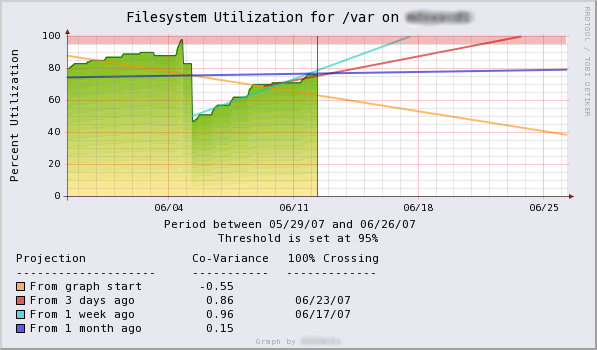
Shows filesystem utilization with projected trend lines based on various starting points in the dataset. Trends are computed using the rrdtool Least Squares Line functions. If a trend is predicted to cross 100% utiliztion within the graph window, the date of the crossing is displayed. -- Damien S. Stuart <[email protected]>, 2007/6
http://oss.oetiker.ch/rrdtool/gallery/index.en.html
Filesystem Utilization and Predicted Trends
Shows filesystem utilization with projected trend lines based on various starting points in the dataset. Trends are computed using the rrdtool Least Squares Line functions. If a trend is predicted to cross 100% utiliztion within the graph window, the date of the crossing is displayed. -- Damien S. Stuart <[email protected]>, 2007/6
http://oss.oetiker.ch/rrdtool/gallery/index.en.html
Grumpy Olde IT Guy
Re: Calculating Rate of Change on Disk Volumes
I'm not sure about altering the graph - that's more of a MRTG or PNP question - but as for alerting based on trend prediction you could probably build a bash script that will use rrdtool and get that prediction for you.
Former Nagios employee
Re: Calculating Rate of Change on Disk Volumes
PNP Questions yes! I have been working with /usr/local/nagios/share/pnp/templates and trying to build a custom template. I have been having issues all day so starting from scratch I took the default template from templates.dist and copied it into /usr/local/nagios/share/php/templates/check_win_disk2.php. I would expect this to produce the same result as when it used the default template but it only renders the 1st data set. This raised a lot of questions regarding PNP and NagiosXI. If anyone has an answer I would appreciate it.
Grumpy Olde IT Guy
-
Box293

- Too Basu
- Posts: 5126
- Joined: Sun Feb 07, 2010 10:55 pm
- Location: Deniliquin, Australia
- Contact:
Re: Calculating Rate of Change on Disk Volumes
I did a talk at the Nagios World Conference 2013 called "Leveraging and Understanding Performance Data and Graphs".
I go through templates and show you how to modify an existing template to create your own. Have a read through it as it includes a lot of information and screenshots which should help.
The slideshow is here (the notes have a lot of information): http://www.slideshare.net/nagiosinc/tro ... and-graphs
The video is here: http://www.youtube.com/watch?v=kqA2KcpUFg4
Cheers
Troy
I go through templates and show you how to modify an existing template to create your own. Have a read through it as it includes a lot of information and screenshots which should help.
The slideshow is here (the notes have a lot of information): http://www.slideshare.net/nagiosinc/tro ... and-graphs
The video is here: http://www.youtube.com/watch?v=kqA2KcpUFg4
Cheers
Troy
As of May 25th, 2018, all communications with Nagios Enterprises and its employees are covered under our new Privacy Policy.
Re: Calculating Rate of Change on Disk Volumes
Thanks Troy, that was great. Thing is I did exactly what you said in your presentation and didn't get the expected result. If I copied the default.php from templates.dist into templates renaming it properly but it doesn't show the second data set when viewing the nagiosxi performance data.
Grumpy Olde IT Guy