Page 1 of 1
Export map on nagios 4.3.4
Posted: Wed Nov 15, 2017 3:55 am
by Chien_San
Dear all,
When i used nagios 4.0.4, the map was created as .png image, i can save all map easily,
but in nagios 4.3.4 i can not find out the way to save all map as picture or pdf, xps... some body can show me the solution, thank you ?
Re: Export map on nagios 4.3.4
Posted: Wed Nov 15, 2017 4:42 pm
by kyang
On my Nagios 4.3.2 I'm able to right-click on a blank space around or above the map and choose "save image as"
This allows me to save it as a png.
Sometimes I don't see the option, so if I keep left-clicking and then right-click it will eventually come up.
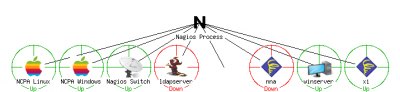
- This is what mine looks like!
Let me know if this helps.
Re: Export map on nagios 4.3.4
Posted: Wed Nov 15, 2017 7:33 pm
by Chien_San
As your picture, i think the format of map on both version 4.0.4 and 4.3.2 are same .png image, but let's try with newer version 4.3.4, the map's really cool, you can zoom x10 with high quality of label, node,..but cannot save all map as a image file, that's the problem !
Re: Export map on nagios 4.3.4
Posted: Thu Nov 16, 2017 3:22 pm
by kyang
Sorry for the misunderstanding. I don't see a way to do so in Nagios Core.
A workaround you could probably do is to just download the "snipping tool" and cut out what you need. Then you can save the map as a picture.
It seems like that is what you're doing right now?
Would this work for you?
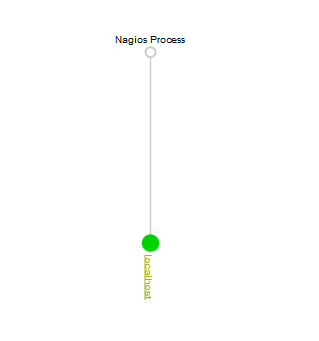
- map.png (3.24 KiB) Viewed 3954 times
Re: Export map on nagios 4.3.4
Posted: Thu Nov 16, 2017 7:17 pm
by Chien_San
Dear kyang,
I have 500 hosts in the map, do you mean that i will zoom in and take picture for each part of map, after that join them togeher ? i think that's possible but not the good way.
Re: Export map on nagios 4.3.4
Posted: Fri Nov 17, 2017 11:33 am
by kyang
Doing this will only display the older map we mentioned before. A kb article explains a bit more.
https://support.nagios.com/kb/article/n ... egacy.html
Go to: open up the file
cgi.cfg
Scroll down or search for
default_statusmap_layout=6
It's probably commented out so take out the "#", and make sure it looks like this.
After that, type this in your URL and it should create the map as an image
Code: Select all
http://<nagiosIP>/nagios/cgi-bin/statusmap.cgi?createimage
I couldn't get this to work on the "new graph" in 4.3.4, so its likely something you would have to put in as a feature request on the Nagios Core Github.
https://github.com/NagiosEnterprises/nagioscore/issues
Re: Export map on nagios 4.3.4
Posted: Sat Dec 02, 2017 10:25 pm
by Chien_San
Sorry, i'm too busy !
I tried as you guided, and nagios 4.3.4 create a .png image as old version 4.0.4,
i just think the resolution of map must be better but it's same. Anyway, thank for your information,
somebody can close this thread.
Re: Export map on nagios 4.3.4
Posted: Mon Dec 04, 2017 10:00 am
by kyang
Sounds good! I'll be closing this thread!
If you have any more questions, feel free to create another thread.
Thanks for using the Nagios Support Forum!