Switch Port Not Graphing on Production Environment

This support forum board is for support questions relating to Nagios XI, our flagship commercial network monitoring solution.
Locked
danniiffxi
Posts: 121
Joined: Tue Jan 30, 2018 3:29 am
Location: UK

Switch Port Not Graphing on Production Environment

Post by danniiffxi »

Hi Guys,

I have a graphing issue I need to try and resolve if possible. It's a bit of an odd one!

The devices in question are our core switches, there are over 200 ports on each and these are working and graphing fine, however last week we had to open up a few more ports. So I went through the process of adding them to Nagios via the wizard (Like I have done many times in the past), everything went fine and the new ports were added into monitoring. However I later noticed the ports in question were not graphing while the rest of the switch was and still is graphing fine.

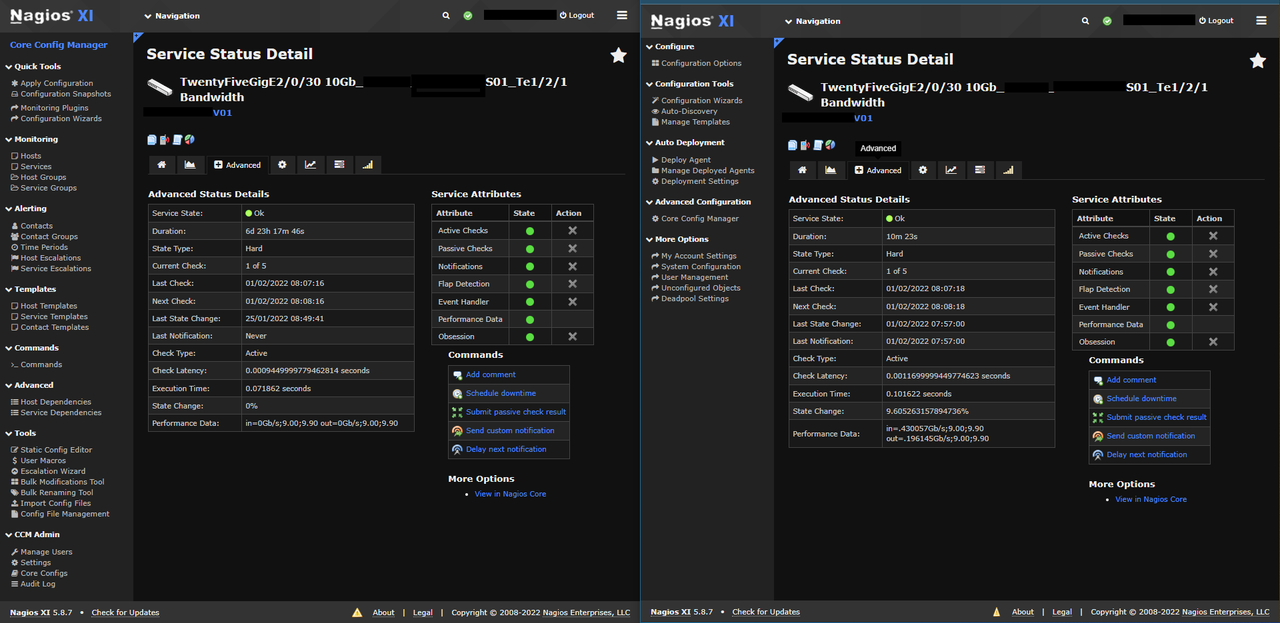
I just added the new ports to our test server as well, and they are working fine on there, so it looks like an issue with our production box not processing the incoming perf data as the graphs just sit at zero all the time.

On the below screenshot is a side by side of my prod and test environments, same switch, same port. On test (the right) it is graphing fine as you can see by the Perf data being received from the switch, yet on the left, our production environment (the left) is not displaying that info and the graph is sat at zero.

I have removed and re-added the ports to the switch, but I get the same each time. Any ideas what would be causing this?
Image


This is the raw output from the CLI.

Test Server

Code: Select all

[root@nagxit02 libexec]# ./check_rrdtraf -f /var/lib/mrtg/192.168.232.250_84.rrd -w 9.00,9.00 -c 9.90,9.90 -l G
OK - Current BW in: 1.48Gbps Out: .74Gbps|in=1.487830Gb/s;9.00;9.90 out=.743094Gb/s;9.00;9.90
Prod Server

Code: Select all

[root@nagxip02 libexec]# ./check_rrdtraf -f /var/lib/mrtg/192.168.232.250_84.rrd -w 9.00,9.00 -c 9.90,9.90 -l G
OK - Current BW in: 0Gbps Out: 0Gbps|in=0Gb/s;9.00;9.90 out=0Gb/s;9.00;9.90

If you need any more info please let me know.
User avatar
tgriep
Madmin
Posts: 9190
Joined: Thu Oct 30, 2014 9:02 am

Re: Switch Port Not Graphing on Production Environment

Post by tgriep »

There is an application called MRTG that gathers the bandwidth data that XI uses for the checks, if that application has an error, it will cause the issue you are having so we will need some information from the server.

Can you run the following commands as root and post the the /tmp/mrtg.txt file or PM it to me?

Code: Select all

LANG=C LC_ALL=C /usr/bin/mrtg /etc/mrtg/mrtg.cfg -debug=cfg,base,log &> /tmp/mrtg.txt
LANG=C LC_ALL=C /usr/bin/mrtg &>> /tmp/mrtg.txt
LANG=C LC_ALL=C /usr/bin/mrtg /etc/mrtg/mrtg.cfg --lock-file /var/lib/mrtg/mrtg.lock --confcache-file /var/lib/mrtg/mrtg.ok --user=nagios --group=nagios &>> /tmp/mrtg.txt
{ time LANG=C LC_ALL=C /usr/bin/mrtg /etc/mrtg/mrtg.cfg 2>1 ; } 2>> /tmp/mrtg.txt
Thank you.
Be sure to check out our Knowledgebase for helpful articles and solutions!
danniiffxi
Posts: 121
Joined: Tue Jan 30, 2018 3:29 am
Location: UK

Re: Switch Port Not Graphing on Production Environment

Post by danniiffxi »

Thanks for getting back to me. I have sent the requested info to you in a PM, please let me know if you need anything else.
User avatar
tgriep
Madmin
Posts: 9190
Joined: Thu Oct 30, 2014 9:02 am

Re: Switch Port Not Graphing on Production Environment

Post by tgriep »

You are monitoring a lot of devices and the MRTG process is not running quick enough to get all of the data from all of the devices and the following will allow more processes which will run quicker.
Edit the /etc/mrtg/mrtg.cfg file and add change the following from

Code: Select all

Forks: 4
to

Code: Select all

Forks: 40
Save the change and that will allow more MRTG process to run and speed up the MRTG process.

Then run this as root to see if there are MRTG processes still running on the server.

Code: Select all

ps -ef --cols=300 |grep mrtg
Kill off any currently running MRTG processes.

If this lock file exists, delete it so the next mrtg process can run.

Code: Select all

/var/lib/mrtg/mrtg.lock
Wait for 15 to 20 minutes and see if the graphs start to update.

Thank you.
Be sure to check out our Knowledgebase for helpful articles and solutions!
danniiffxi
Posts: 121
Joined: Tue Jan 30, 2018 3:29 am
Location: UK

Re: Switch Port Not Graphing on Production Environment

Post by danniiffxi »

Hi,

I have done as requested, unfortunately I am still getting the same issue. After adjusting the /etc/mrtg/mrtg.cfg file I gave the server a clean reboot.

Config file now reads as

Code: Select all

######################################################################
# Multi Router Traffic Grapher -- Example Configuration File
######################################################################
# This file is for use with mrtg-2.0
#
# Note:
#
# * Keywords must start at the begin of a line.
#
# * Lines which follow a keyword line which do start
#   with a blank are appended to the keyword line
#
# * Empty Lines are ignored
#
# * Lines starting with a # sign are comments.

# Where should the logfiles, and webpages be created?

# Minimal mrtg.cfg
#--------------------

HtmlDir: /var/www/mrtg
ImageDir: /var/www/mrtg
LogFormat: rrdtool
LogDir: /var/lib/mrtg
ThreshDir: /var/lib/mrtg
WorkDir: /var/lib/mrtg
Forks: 40
EnableSnmpV3: yes

Include: conf.d/*.cfg

EnableSNMPv3: yes
LibAdd: /opt/rrdtool-1.4.4/lib/perl/5.16.3
This is the output from ps -ef --cols=300 |grep mrtg

Code: Select all

[root@nagxip02 ~]# ps -ef --cols=300 |grep mrtg
root      25632  20532  0 09:14 pts/0    00:00:00 grep --color=auto mrtg
User avatar
tgriep
Madmin
Posts: 9190
Joined: Thu Oct 30, 2014 9:02 am

Re: Switch Port Not Graphing on Production Environment

Post by tgriep »

Let's run the plugin in verbose mode.
Run this on the production server as the nagios user and post the output here.

Code: Select all

su - nagios
/usr/local/nagios/libexec/check_rrdtraf -f /var/lib/mrtg/192.168.232.250_84.rrd -w 9.00,9.00 -c 9.90,9.90 -l G -vv
Then get the rrd file from the /var/lib/mrtg folder and post it here so I can view it's content.

Thank you.
Be sure to check out our Knowledgebase for helpful articles and solutions!
danniiffxi
Posts: 121
Joined: Tue Jan 30, 2018 3:29 am
Location: UK

Re: Switch Port Not Graphing on Production Environment

Post by danniiffxi »

I've done that and sent the file to you in a PM.

Thank you
User avatar
tgriep
Madmin
Posts: 9190
Joined: Thu Oct 30, 2014 9:02 am

Re: Switch Port Not Graphing on Production Environment

Post by tgriep »

Thanks for the rrd file.

I see that MRTG is not updating the data.

I see that rrdcached was added to the server and it modified the mrtg.cfg file.

Edit the /etc/mrtg/mrtg.cfg file and remove this line.

Code: Select all

LibAdd: /opt/rrdtool-1.4.4/lib/perl/5.16.3
Save the file.

Make sure the rrdtool-perl package is still installed by running this as root to either install it or reinstall it.

Code: Select all

yum install rrdtool-perl -y
yum reinstall rrdtool-perl -y
Make sure the permissions for the /var/lib/mrtg folder and files are correct. Run this as root.

Code: Select all

chown apache:nagios /var/lib/mrtg -R
chmod 775 /var/lib/mrtg
chmod 664 /var/lib/mrtg/*
Then wait for 15 minutes to see if the checks start to show bandwidth data.

Thank you.
Be sure to check out our Knowledgebase for helpful articles and solutions!
danniiffxi
Posts: 121
Joined: Tue Jan 30, 2018 3:29 am
Location: UK

Re: Switch Port Not Graphing on Production Environment

Post by danniiffxi »

Graphs have now been populating for the past hour.

Looks like everything is now working, thank you or you help :)
User avatar
tgriep
Madmin
Posts: 9190
Joined: Thu Oct 30, 2014 9:02 am

Re: Switch Port Not Graphing on Production Environment

Post by tgriep »

Your welcome, glad it is working again.

I will lock this post as solved but feel free to post in the future for any other issues or questions.

Thank you.
Be sure to check out our Knowledgebase for helpful articles and solutions!
Locked