THIS KNOWLEDGE BASE HAS BEEN ARCHIVED AND IS NO LONGER BEING UPDATED
Please visit library.nagios.com/docs for the latest and most up-to-date documentation.
Home » Categories » Products » Nagios Log Server » Troubleshooting » Common Problems

Nagios Log Server - Newline Character Added When Adding A Filter To A Search

Problem Description

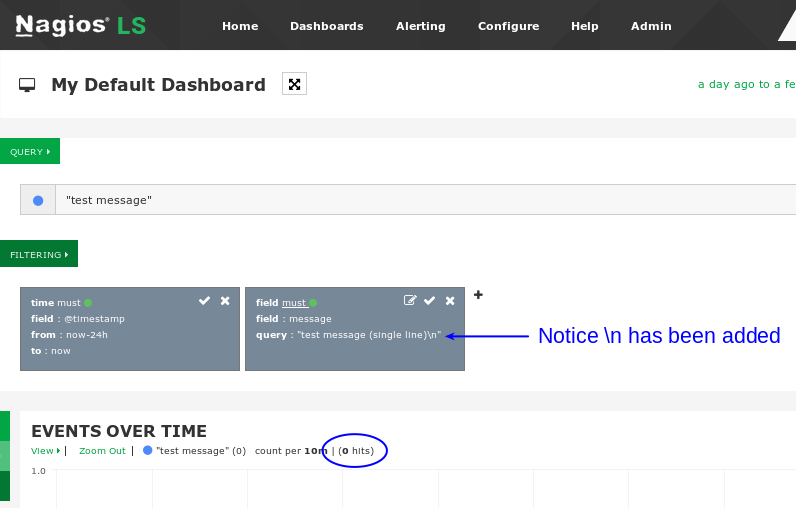
You will observe that sometimes filters that are added to a search contain a newline (\n) character to the filter and due to this no results are found.


Explanation

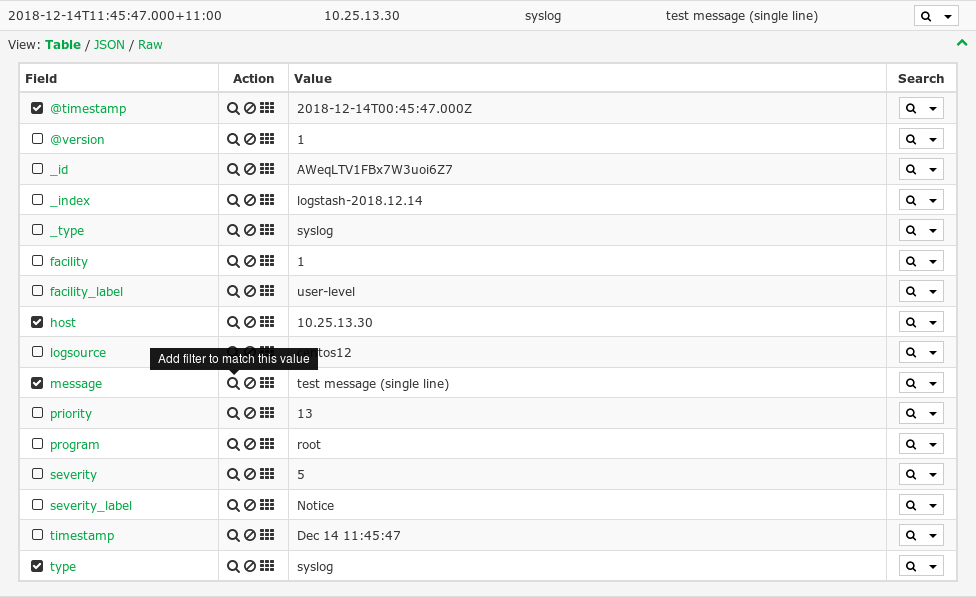
In this screenshot, you can see that from an event, clicking the Magnifying Glass icon will add a filter which matches the value in the field:


This screenshot shows the filter that was added. You can see that \n was added to the filter, and you can see below this causes 0 hits to be returned:


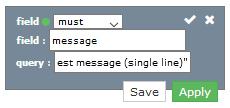
You can edit the filter to remove \n which will result in search results being correctly returned.


Resolving The Problem

What is causing this is that the original server that sent the syslog message had \n as part of the message. When you are seeing the value in the event in Nagios Log Server, \n is not being displayed, but it is there in the data.

It has been observed that:

  • When syslogs are sent via TCP, \n is also sent

  • When syslogs are sent via UDP, \n is NOT sent

For more information about TCP and UDP with syslog, please refer to this KB article under the section "Remote Server - Check Rsyslog Config":

Documentation - Logs Not Searchable or Not Coming In


Final Thoughts

For any support related questions please visit the Nagios Support Forums at:

http://support.nagios.com/forum/


Special Offer For Knowledgebase Visitors! Get a huge discount on Nagios Log Server by clicking below.

Get 60% Off Nagios Log Server!

Did you know? Nagios provides complete monitoring of: Windows, Linux, UNIX, Servers, Websites, SNMP, DHCP, DNS, Email, Storage, Files, Apache, IIS, EC2, and more!

1 (5)
Article Rating (5 Votes)
Rate this article
  • Icon PDFExport to PDF
  • Icon MS-WordExport to MS Word
Attachments Attachments
There are no attachments for this article.
Related Articles RSS Feed
Nagios Log Server - Troubleshooting Commands
Viewed 8737 times since Mon, Feb 11, 2019
Forwarding Logs from Nagios Log Server to Another Destination
Viewed 8420 times since Wed, Sep 16, 2020
Nagios Log Server - rsyslog and JSON Formatted Log Files
Viewed 6066 times since Thu, Mar 2, 2017
Nagios Log Server - Logstash process dying
Viewed 7178 times since Mon, Apr 10, 2017
Nagios Log Server - Logstash not running after upgrade to 2.0
Viewed 5126 times since Tue, Nov 14, 2017
Logs Not Appearing with Failed to Parse Date Error
Viewed 4042 times since Mon, Feb 22, 2021
Installation errors on customized corporate builds of CentOS or RHEL
Viewed 15558 times since Tue, Jan 26, 2016
Nagios Log Server - Understanding and Troubleshooting Yellow Cluster Health
Viewed 14899 times since Mon, Feb 15, 2016
Pages Not Displaying Correctly
Viewed 9733 times since Mon, Jan 25, 2016
Web Browser Reports 330 Error Content Encoding
Viewed 9507 times since Tue, Mar 7, 2017