| Home »
Categories »
Multiple Categories |
Nagios XI - Problems with $ Signs in the Check Command |
|
Article Number: 168 | Rating: 1/5 from 8 votes | Last Updated by tlea on Tue, Feb 27, 2018 at 6:17 PM
|
Problem Description
Certain services in Microsoft Windows use special characters in the service name like MSSQLFDLauncher$UWCX01. This causes problems with Nagios as it thinks the $ is part of a variable.
Resolving The Problem
Using NCPA
Your service definition will need two $$ signs.
MSSQLFDLauncher$$UWCX01

Save and Apply Configuration.
Note: The Test Check Command button will not work due to these special characters.
Using NSClient++
Your service definition will need a backslash \ and two $$ signs.
MSSQLFDLauncher\$$UWCX01
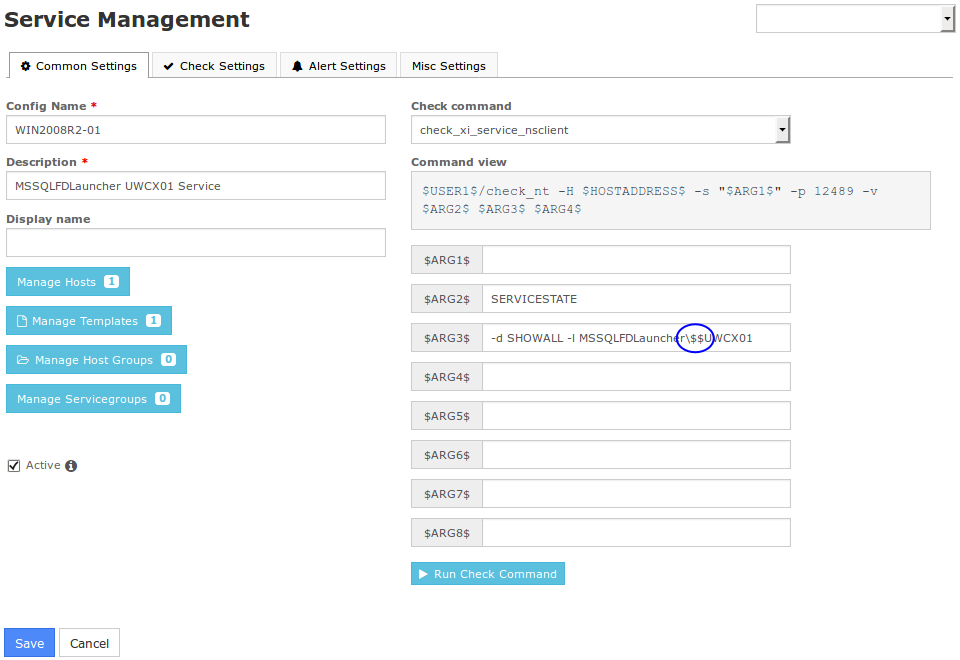
Save and Apply Configuration.
Note: The Test Check Command button will not work due to these special characters.
Final Thoughts
For any support related questions please visit the Nagios Support Forums at:
http://support.nagios.com/forum/
Special Offer For Knowledgebase Visitors! Get a huge discount on Nagios Log Server by clicking below.

Did you know? Nagios provides complete monitoring of: Windows, Linux, UNIX, Servers, Websites, SNMP, DHCP, DNS, Email, Storage, Files, Apache, IIS, EC2, and more!
|
|
|
Have a question? Try our Forums! | Give Feedback |
1 (8)
Article Rating (8 Votes)
Rate this article
|
| |
|
Attachments 
There are no attachments for this article.
| Related Articles 
Nagios XI - Using the Negate Plugin
Viewed 10192 times since Thu, Jan 28, 2016
NRPE - Agent and Plugin Explained
Viewed 78540 times since Fri, Jul 14, 2017
NCPA - Agent Installation Issue
Viewed 8348 times since Thu, Jan 21, 2016
|
|
;)

;)
;)

;)
;)
;)

;)
;)
;)
;)
;)
;)
;)
;)
;)
;)
;)
;)
;)
;)
;)
;)
;)
;)

;)
;)
;)
;)
;)
;)
;)
;)
;)
;)
;)
;)
;)
;)
;)
;)
;)

 Subscribe to Article
 Print Article
 Email Article to Friend
 Export to PDF
 Export to MS Word