;)

;)
;)

;)
;)
;)

;)
;)
;)
;)
;)
;)
;)
;)
;)
;)

;)
;)
;)
;)
;)
;)
;)
;)
;)
;)
;)

Problem Description
In Core Configuration Manager (CCM) when you Apply Configuration you receive the error message Configuration verification failed :
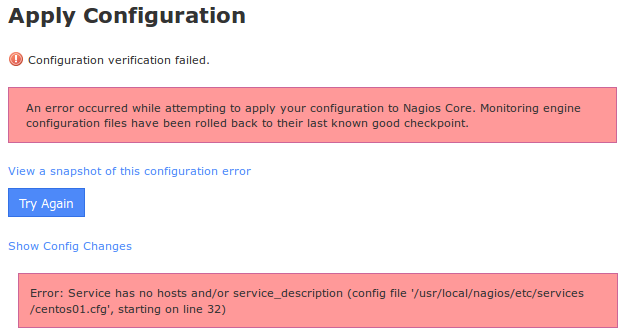
When you click the Show Errors link a message is shown that indicates the problem in the config files along with a line number for the config file. However when looking at the config file in a text editor, the line number does not appear to relate to the problem.
Explanation
The Apply Configuration process is as follows:
- New config files are temporarily written to disk
- Nagios verifies the config files are valid
- Temporary config files are made permanent
- Nagios service is restarted
When the verification step fails, the temporary files are discarded. Hence when you go to look at the file to look at the line number it references it is not valid as the temporary files now longer exist.
Resolving The Problem
The following steps will force the config files to be written to disk, allowing you to investigate the problem.
Note : The following steps include a delete step. You will not lose any configs as only the flat config files are deleted, the original configs still exist in the database.
- Open CCM
- Tools > Config File Management
- Click the Delete Files button
- It will say "Successfully deleted all Host / Service Config Files"
- Click the Write Configs Button
- It will show an output of all the files it creates, in large deployments this step may take a long time .
- Click the Verify Files button
- The output should end with the error message you have experienced previously.
At this point, you can open an SSH session to your Nagios XI server and open the file in a text editor to investigate the problem.
Normally the error message explains the problem, in this example it is:
The following error message is produced:
Service has no hosts and/or service_description (config file '/usr/local/nagios/etc/services/centos01.cfg', starting on line 32)
From this you can determine that it is a config of a service for centos01 .
For this specific problem, there was no host assigned to the service. After updating the service in CCM, following the Write and Verify steps above, the verify process should succeed.
Note : It can be possible that there are multiple config errors for different objects, you will need to keep repeating the above process until the Verify succeeds.
Once the Verify succeeds:
- Quick Tools > Apply Configuration
- Click the Apply Configuration button
Final Thoughts
For any support related questions please visit the Nagios Support Forums at:
http://support.nagios.com/forum/

 Subscribe to Article
 Print Article
 Email Article to Friend
 Export to PDF
 Export to MS Word
