;)

;)
;)

;)
;)
;)

;)
;)
;)
;)
;)
;)
;)
;)
;)
;)

;)
;)
;)
;)
;)
;)
;)
;)
;)
;)
;)

Problem Description
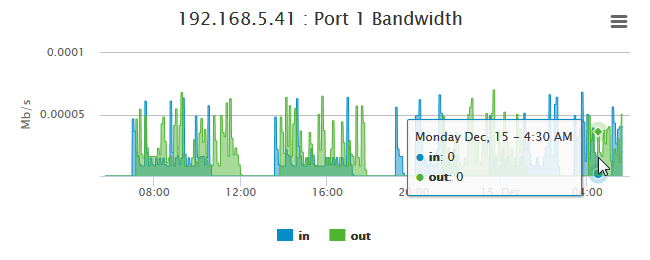
When running Nagios XI on a system which uses certain non-English languages, bandwidth services (amongst others) and their associated graphs may incorrectly report 0 Mb/s even though there is traffic actively flowing through the given port.
Editing Files
In many steps of this article you will be required to edit files. This documentation will use the vi text editor. When using the vi
editor:
- To make changes press i on the keyboard first to enter insert mode
- Press Esc to exit insert mode
- When you have finished, save the changes in vi by typing :wq and press Enter
Resolving The Problem
The easiest way to fix this is to edit the resource.cfg file and add LC_ALL=C before the $USER1$ macro as a prefix to be run before all commands Nagios runs.
- Open the /usr/local/nagios/etc/resource.cfg file in your preferred text editor.
- Edit the $USER1$ macro (typically the second line of the file) to be as follows:
$USER1$=LC_ALL=C /usr/local/nagios/libexec
- Save and close the file, then restart the nagios service using one of the commands below:
RHEL 7 | CentOS 7 | Oracle Linux 7 | Debian | Ubuntu 16/18
systemctl restart nagios.service
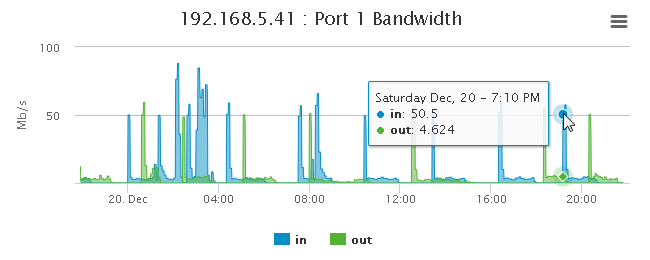
- Graphs should start showing proper information. It may take up to 15 minutes for the changes to take effect, possibly longer for large environments.
Before:
After:
Additional Information
Setting LC_ALL=C before all Nagios commands will force the system language to whatever language the strings in the plugin/binary/application are written in, only for the duration of that command. This will not have an effect on the configured system language itself, and will only take effect when Nagios is running the command. In the case of Nagios XI installations, the plugins included by default are written in English and use the "1,000.00" number format, which is properly interpreted by check_rrdtraf and other plugins.
In systems using certain non-English languages (Spanish, French, and Russian, for example) numbers are represented differently. Whereas in English the comma (,) is used as the thousands separator and the period (.) is used as a decimal separator, most other languages will reverse the two, so that "one-thousand" would be written as "1.000,00" instead of "1,000.00". This causes the graphing to interpret the data incorrectly. Instead of seeing, for example, "1,270 MB/s" the system would see "1.270 MB/s" which is of course orders of magnitude smaller.
Resources
http://unix.stackexchange.com/questions/87745/what-does-lc-all-c-do
Final Thoughts
For any support related questions please visit the Nagios Support Forums at:

 Subscribe to Article
 Print Article
 Email Article to Friend
 Export to PDF
 Export to MS Word
