;)

;)
;)

;)
;)
;)

;)
;)
;)
;)
;)
;)
;)
;)
;)
;)

;)
;)
;)
;)
;)
;)
;)
;)
;)
;)
;)

Problem Description
After running the Windows Server wizard you notice that the Windows memory usage checks have values that do not match up with the physical memory in the server.
Explanation
The checks created by the wizard use the check_nt plugin with the MEMUSE command.
Windows refers to the sum of memory and swap files, that is, the entire available virtual memory. Windows regularly swaps program and data code from the main memory, even when it still has spare reserves. The values returned aren't necessarily a bug in Nagios XI or NSClient++, but rather a view of the virtual memory of the machine.
In this respect the load of the entire virtual memory in Windows is the more important parameter to observe over simply physical or swap.
However if you want to monitor the physical memory in the server you will need to change the command to use the check_nrpe plugin along with enabling the NRPE module in NSClient++.
Creating Physical Memory Check
First, please refer to these guides in enabling the NRPE Listener module in NSClient++:
Nagios KB - Configuring NSClient++
Next, you will create / edit the service in Core Configuration Manager (CCM) to use the check_nrpe command along with the CheckMEM arguments. Please refer to the following screenshot:
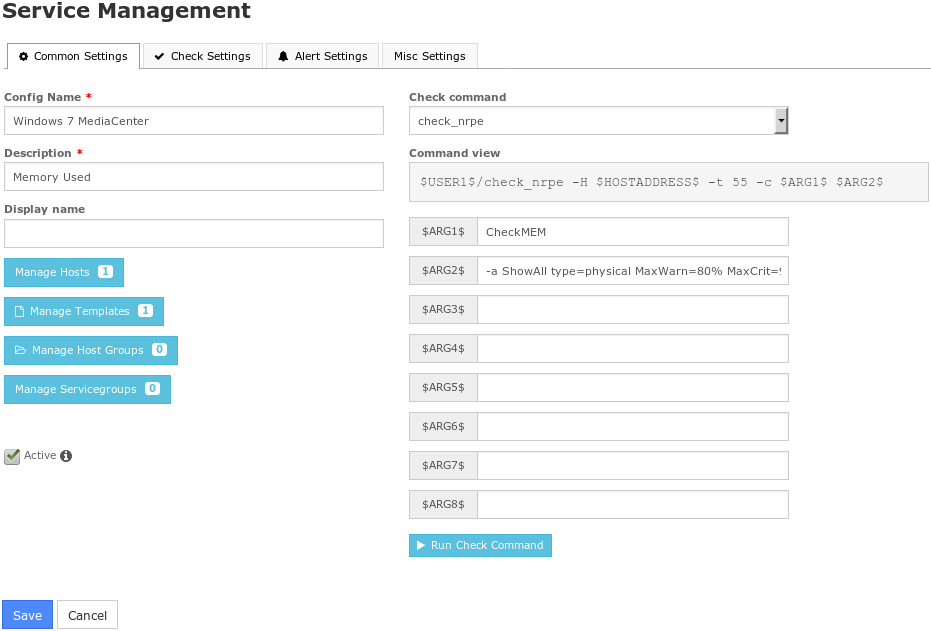
In the screenshot above, the $ARG2$ field is populated with:
-a ShowAll type=physical MaxWarn=80% MaxCrit=90%
Once created, save and then Apply Configuration.
Final Thoughts
For any support related questions please visit the Nagios Support Forums at:

 Subscribe to Article
 Print Article
 Email Article to Friend
 Export to PDF
 Export to MS Word
