;)

;)
;)

;)
;)
;)

;)
;)
;)
;)
;)
;)
;)
;)
;)
;)

;)
;)
;)
;)
;)
;)
;)
;)
;)
;)
;)

Problem Description
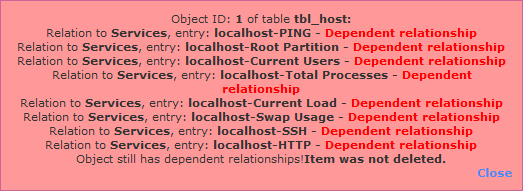
In Nagios XI when trying to delete or deactivate a host through the Core Configuration Manager, you may get the following error (or one similar to it) in a red box near the top of your screen:
Resolving The Problem
In order to delete or deactivate a host, you must first delete or deactivate all of the services and other objects that are attached to it.
-
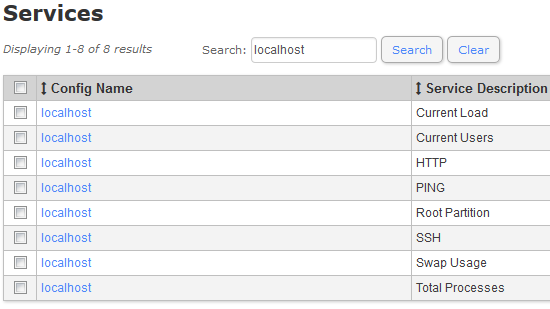
Using services as an example, click the Services link in the left-hand navigation pane of the Core Configuration Manager.
-
Next, use the search bar to find the services that are attached to the host you wish to delete.
-
Usually these will be named after the host, so you can simply search for the host name.
-
However if they are not named after the host (possibly because they were created manually or the name was changed) then you will need to search for them directly using the names as they appeared in the red error box.
-
Once you have found the attached services you can select which to delete or deactivate by checking their individual checkboxes, located to the left of their entries in the search results table.
-
To select or deselect all of the displayed services, you may check or uncheck the box to the left of the words "Config Name" at the top of the table.
-
Once you have the desired services selected, you can use the "With Checked" dropdown box located beneath the search results table to choose your desired action.
-
Choosing Delete will remove the services from the Core Configuration Manager database, while Deactivate will leave them but not apply them to the active configuration - this is useful if you may need to reactivate the services later.
Once you have deleted or deactivated the services, you may go back to the host and delete or deactivate it as well.
Additional Information
In addition to services, there may also be service dependencies, host dependencies, service escalations, host escalations, service templates or hostgroups that are either attached to or otherwise reference the host you are attempting to delete. These will similarly need to be deleted or deactivated and will be referenced in the error displayed when attempting to delete the host.
Final Thoughts
For any support related questions please visit the Nagios Support Forums at:

 Subscribe to Article
 Print Article
 Email Article to Friend
 Export to PDF
 Export to MS Word
